


Revit. Elements filter. Filtering by elevation
While working on a new version of the Parametrization plugin, we came across a request from a user who asked us to make a strategy for processing elements by levels. After evaluating the task, we came to the following conclusions:
- The settings of such a strategy will be different from the settings of all other strategies, which means that it will require a lot of unjustified labor.
- Parametrization is not the only one that may require such a condition.
That's why we took the most logical solution - we modified the elements filter. Now two new key parameters are available in the equality parameters window - BottomZ and TopZ:
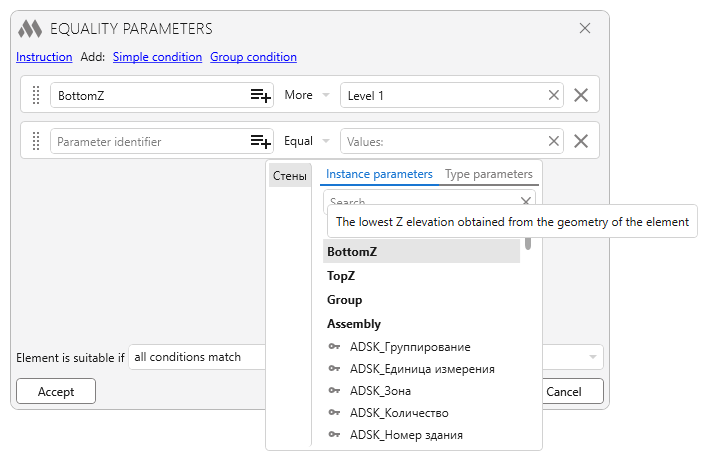
When using these conditional parameters, the lowest and the highest elevation from the element geometry are checked, respectively. The key parameters BottomZ and TopZ are considered numeric and are checked by the corresponding conditionals. The values of the elevations are taken in millimeters rounded to three decimal places. In the "Value" field you can specify level names: if the specified level is found, its elevation in millimeters rounded to 3 decimal places will be used. I.e. you can write the condition "BottomZ >= Level 1 AND TopZ <= Level 2" and thus filter out the elements located between the first and the second level!
Enjoy your work with ModPlus!
New plugin for Revit. MEP split
Introducing a new plugin in the line of MEP plugins - MEP split!
This plugin allows you to split MEP curves with different conditions:
- By level
- By reference planes
- By maximum length
- By exact length
- With specified number of parts.
The plugin also allows you to merge previously split MEP curves!
The possibility to process manually selected elements or elements selected by filters is present!
We have demonstrated all these features in a short video:
https://youtu.be/moy762jRKrM
Enjoy your work with ModPlus!
AutoCAD. Copy with numbering. Copying along curve
Introducing the update of AutoCAD plugin - Copy with numbering 3.0!
In the new version you will have access to copy along a curve with various options:
- Copy by repeating the path or copy directly along the curve
- Copy with a limited number of copies
- Copy with offset
- Copy with curve division
We have demonstrated the new features in our new demo video:
https://youtu.be/tq8KLkkN0u8
Enjoy your work with ModPlus!
Revit. Sheet numerator 3.0. Collections, non-printable characters and modification of existing numbers
We present you a new version of the plugin Sheet numerator 3.0!
Revit 2025 that came out this year gave us such a great thing as Sheet Collections and we finally got around to sheet plugins and added support for collections:
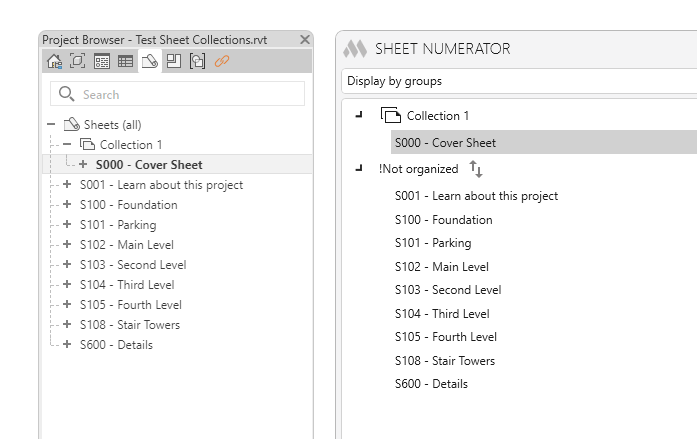
And not only visually are collections taken into account, but also when numbering through the plugin - if sheets are in a collection, their numbers are not unique and repeating the number by the plugin will not display warnings.
New plugin for AutoCAD. Sum of areas
Introducing a new free plugin for AutoCAD - Sum of areas!
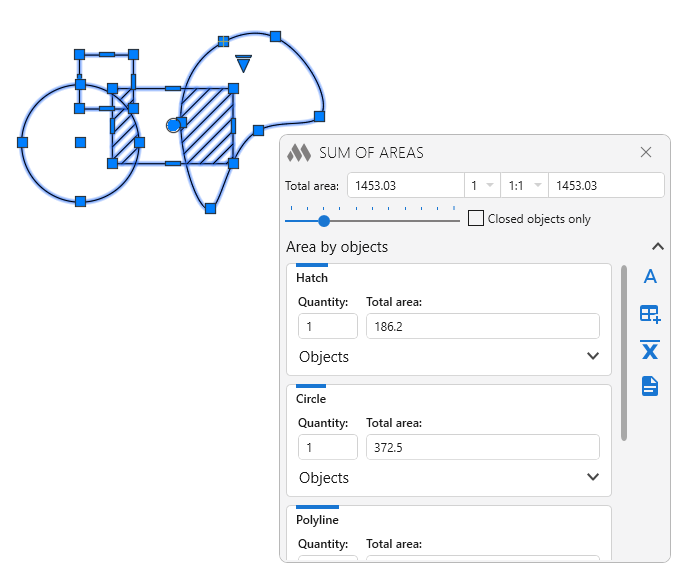
The new plugin in its appearance and capabilities is completely similar to the Sum of Lengths plugin, with only one difference - it calculates the sum of areas. The plugin processes hatches, polylines, splines, circles and arcs:
Enjoy your work with ModPlus!