
Sum of lengths

Sum of lengths
This is a free plugin!
Calculating the count and total length of selected lines, polylines, circles, arcs, and splines

Call options

  • ModPlus floating menu or palette
  • AutoCAD ribbon
  • Command line: _mpSummLength

Icon

mpSummLength_32x32 mpSummLength_16x16 mpSummLength_32x32_dark mpSummLength_16x16_dark

Using

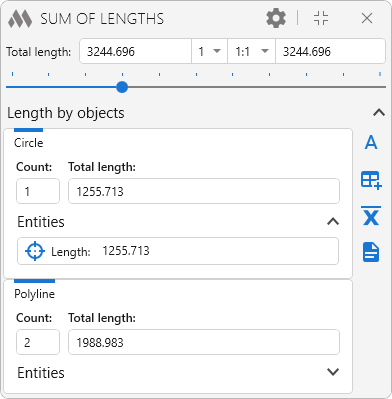
The plugin calculates the total length of selected lines, polylines, circles, arcs, ellipses, and splines. Objects can be selected either before launching the plugin or while the plugin window is open. Calculation results are displayed in the plugin window:
1

The upper part of the plugin window displays the total length of the selected objects, the multiplier, the scale, and the final length calculated using the multiplier and scale. The final value field cannot be edited manually. Clicking it copies the final value to the clipboard.

When entering multiplier and scale values manually, either a period or a comma can be used as the decimal separator.

The contents of the Length by Objects section, as well as the blocks for individual object types, can be collapsed and expanded using the buttons on the right side of the corresponding headers.

4 – insert the result as single-line text:

Insertion point: – specify the insertion point for the single-line text.

5 – insert the result into a table cell:

Select table: – select a table.

Select cell: – select the cell in which to insert the result.

average – export the arithmetic mean (including rounded results) for each object type and for all selected objects to a txt file.

3 – export the result to a txt file.

Entities – list of selected objects.

6 – zoom to fit the current object on the screen.

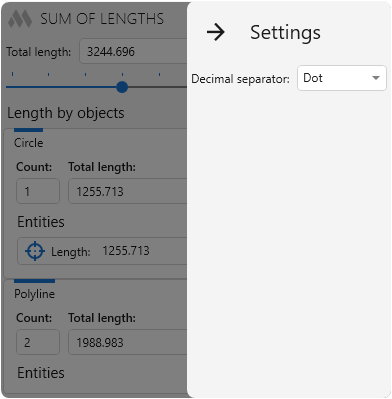
The cog (gray) button in the upper-right corner opens the plugin settings:
2

Decimal separator – specifies the decimal separator used when displaying results.

New
Added the choice of the decimal separator
New
Added copying of the total value to the clipboard by clicking the result field
New
Added the ability to collapse the window content
Improved
Added the ability to use both a dot and a comma to separate the fractional part in coefficients
Improved
Prohibited manual editing of the field with the total value
Fix
Fixed an error where fractional coefficients were not saved when the window was opened again
Fix
Fixed an error where a fractional coefficient selected from the list was not applied with some Windows regional settings
New
Fixed an error where a scale with a fractional part gave an incorrect total value with some Windows regional settings
Improved
The interface was migrated to the current version of the ModPlus styling library
Fix
Fixed a bug causing AutoCAD to shut down when switching to the start tab for document selection
New
Added support for Polyline3d, Polyline2d
Improved
Restricted ability to cut text from fields that display scale
New
Added the length of all objects to the export of results to a txt file
Improved
Small design improvements
Fix
Fixed an error that occurs when closing the plugin window if there are no open drawings
New
Added the ability to multiply the result by a specified annotative scale
New
Added restore object selection, which is reset when open a plugin window that does not lock AutoCAD
New
Added dynamic calculation of the total length when changing the current selection of elements
Improved
Output of the arithmetic mean, taking into account rounding
New
Added output of the arithmetic mean
FIX
Completely rewritten function code
FIX
Added the ability to get the sum of the lengths of selected entities without closing the window function
FIX
Insert the result as text, in a table cell and export to Notepad take into account the separator of the integer and fractional digits specified in the settings
FIX
Added display of the length of each entity
FIX
Fixed display of results when a dark design
FIX
Added the option of rounding the result
FIX
Added the ability to insert the result in the table cell
FIX
Added the ability to insert the result in the form of a single line of text