


Sheet numerator

Several Revit applications are running. Choose one:
| Name | Discount | Total value of individual orders | Total value of corporate orders |
|---|---|---|---|
| Regular user | 0% | ||
| 3% discount | 3% | $84 | $180 |
| 5% discount | 5% | $120 | $360 |
| 7% discount | 7% | $180 | $600 |
| 10% discount | 10% | $300 | $900 |
| 15% discount | 15% | $360 | $1 200 |
| Partners | 30% | ||
| BIM Consulting | 50% | ||
| Super VIP | 100% |
Icon


Related news and articles
- New plugin for Revit: Sheet numerator
- Revit: Sheet numerator v2.0
- Revit. Sheet numerator. Leading zeros in the sheet number
- Revit. Sheet numerator 3.0. Collections, non-printable characters and modification of existing numbers
Using
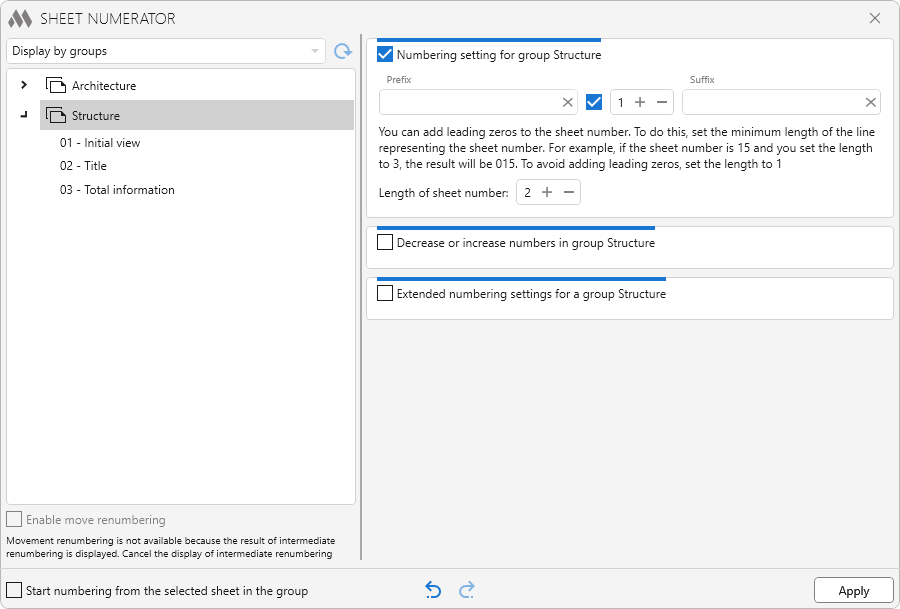
In the upper left part of the window there is a drop-down list with the option of displaying sheets:
Display by groups – with this option, the list will be filled in by analogy with the project browser. Sheets will be placed in groups according to the browser organization settings.
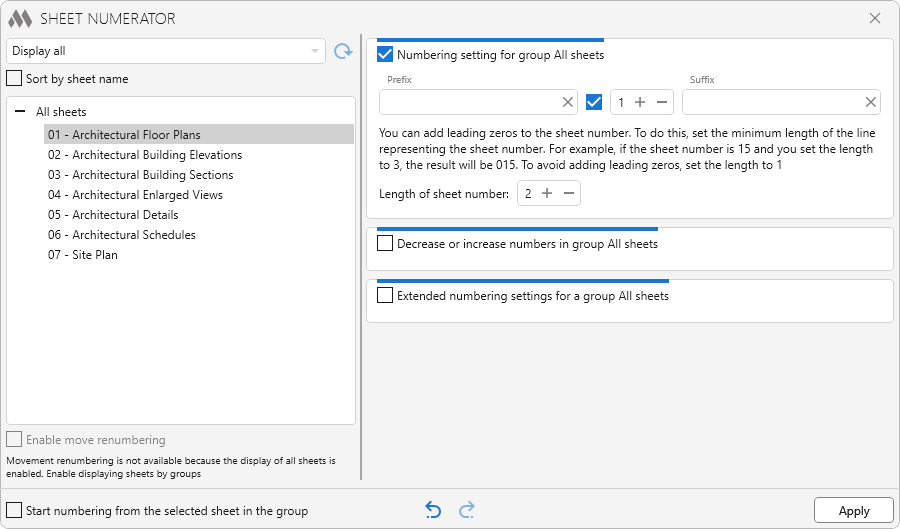
Display all – with this option, all sheets will be displayed in one group.
 – reload sheet list. The button becomes active if the sheets in the list have been moved, but the numbering has not been applied.
Sort by sheet name – this option is available for the Display all mode and allows sorting sheets in the list by sheet name.
Below is a field that displays the sheets in groups. Sheets in the list can be dragged with the mouse. You can drag sheets only within one group. When you select a list or group in the list, a preliminary renumbering will be automatically performed – the sheets will change the number according to the current renumbering settings. At the same time, a warning icon may appear to the left of the sheet  that indicates that the number of this sheet, with the current renumbering settings, coincides with the number of another sheet. No renumbering possible
If unchecked Enable move renumbering and at the same time move at least one sheet in the list, then a warning icon will appear at the bottom of the list  . This icon indicates that the position of the sheets in the list does not match the position of the sheets in the project browser. If this icon is displayed, it is not possible to enable the renumbering option by moving. The icon will disappear as soon as the renumbering with the current position of the sheets is applied
Enable move renumbering – when this option is enabled, the possibility of renumbering sheets in the group by specified settings is disabled. If you move the sheet in the list of sheets, all the sheets in the group will be renumbered: the position of the sheets relative to each other will change, but the continuous numbering in the group will remain the same
| It was | Moved | It became |
|
Sheet Title moved to position between sheets Initial view and Total information |
|
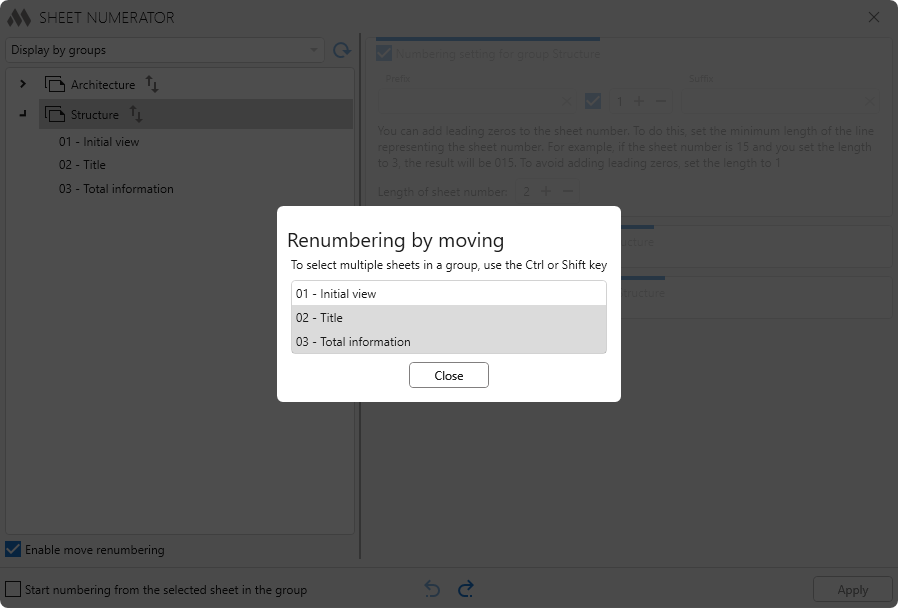
Opposite to the sheet group name there is a button  – to perform batch renumbering by moving the sheets of the current group. Clicking it opens a window with a list of sheets in the group, in which you can select and move several sheets, using the Ctrl or Shift key. When the window closes, the sheets in the group will be renumbered.
In the right part there are fields with re-numbering settings for the current group.
Simple numbering settings for a group
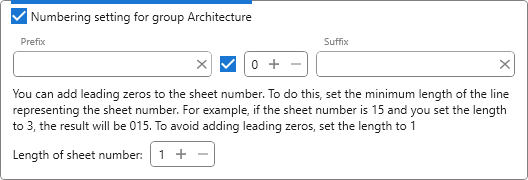
Prefix, Suffix – fields for specifying the prefix and suffix in the new sheet numbers, respectively.
Numeric field – field to set the initial numbering number.
If the checkbox in front of the numeric field is unchecked, the sheet number will not change, but you can set a Prefix and/or Suffix for the existing sheet number.
If the checkbox in front of the numeric field is checked, the sheets will be renumbered in full according to the settings.
Length of the sheet number – field for adding leading zeros. How to choose the required length is described in the plugin window.
DECREASE OR INCREASE NUMBERS IN GROUP

Decrease or increase existing sheet numbers in the group by the value specified in the field.
Extended numbering settings for group
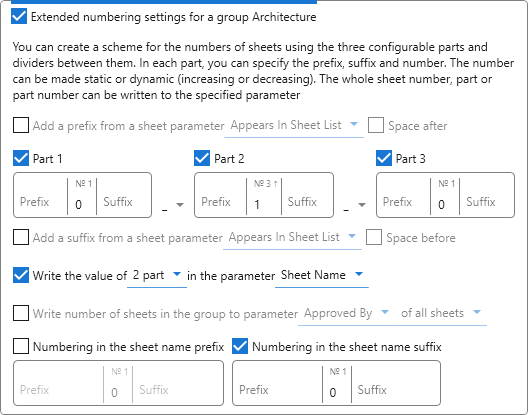
Add a prefix from a sheet parameter X – when checked, the selected sheet parameter X will be indicated as a prefix in the new sheet numbers.
Part 1,2,3 – customizable part of the sheet number. New sheet numbers will be composed of parts and separators between parts. For each part, you can specify a prefix, suffix and number.
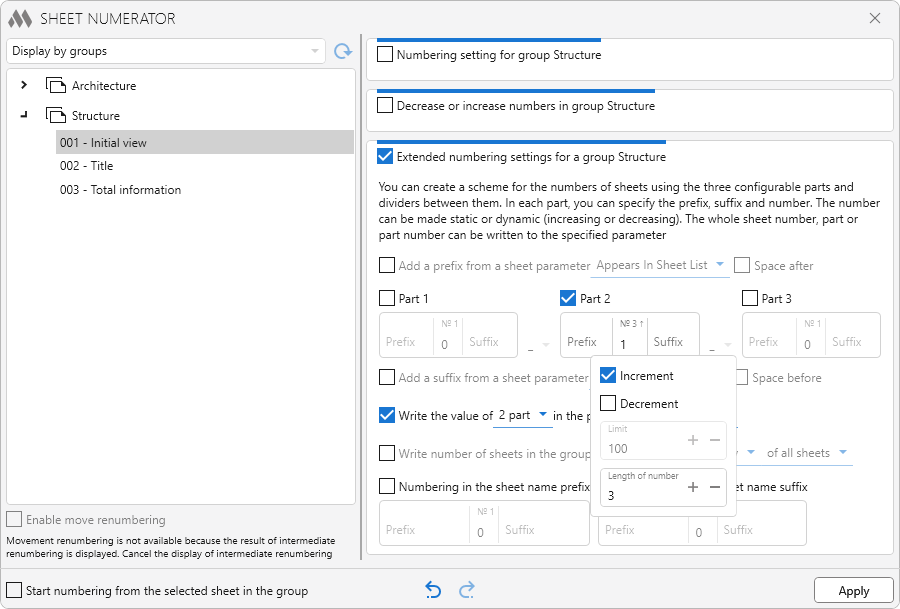
The settings for the number are displayed if you left-click in the number entry field:
- Increment – if checked, the number will dynamically increase from the number specified in the field.
- Decrement – when checked, the number will dynamically decrease starting from the number specified in the field.
- Limit – the field where you should specify the upper limit – the number from which the numbing will start when it reaches zero.
- Length of number – the field for adding leading zeros.
Add a suffix from a sheet parameter X – when checked, the selected sheet parameter X will be specified as a suffix in new sheet numbers.
Write the value of X in the parameter Y – when checking one of 7 possible values of X (all number, part value or part number value) will be written to the selected parameter of the sheet Y.
Write number of sheets in the group to parameter X of first sheet/of all sheets – when checked, the number of sheets in the group will be written to the selected parameter X of only the first sheet or all sheets.
Numbering in the sheet name prefix – when checked, the numbering will be added to the sheet name prefix. The numbering setup is the same as described above for Part 1,2,3.
Numbering in the sheet name suffix – when checked, numbering will be added to the sheet name suffix. The numbering setup is the same as described above for Part 1,2,3.
General numbering settings
Start numbering from selected sheet in the group – if the option is enabled, the preliminary renumbering will not be performed on all sheets in the group, but only starting from the selected sheet. The settings are applied to the group both when the entire group is selected in the list, and when a sheet is included in the list that is included in the group.
 – allows you to disable display of the preliminary renumbering for the current group.
 – allows you to enable display of the preliminary renumbering for the current group.
Apply – allows you to commit changes to the numbering of sheets in the current project according to the settings for the numbering for the group.

 YouTube
 YouTube