


Room volume

Several Revit applications are running. Choose one:
| Name | Discount | Total value of individual orders | Total value of corporate orders |
|---|---|---|---|
| Regular user | 0% | ||
| 3% discount | 3% | $84 | $180 |
| 5% discount | 5% | $120 | $360 |
| 7% discount | 7% | $180 | $600 |
| 10% discount | 10% | $300 | $900 |
| 15% discount | 15% | $360 | $1 200 |
| Partners | 30% | ||
| BIM Consulting | 50% | ||
| Super VIP | 100% |
Icon


Related news and articles
Using
Plugin allows you to create a room and space volume view in the model using DirectShape in the "Generic Model" category in combination with elements of the "Parts" category. For correct display of the plugin result it is necessary to enable visibility of the specified categories on the current view. Elements of the DirectShape type refer to non-editable geometry.
The stages of the current view are taken into account when creating a room and space volume view.
Plugin window consists of three main parts: selection of the grouping parameter, the volume views tree, control buttons.
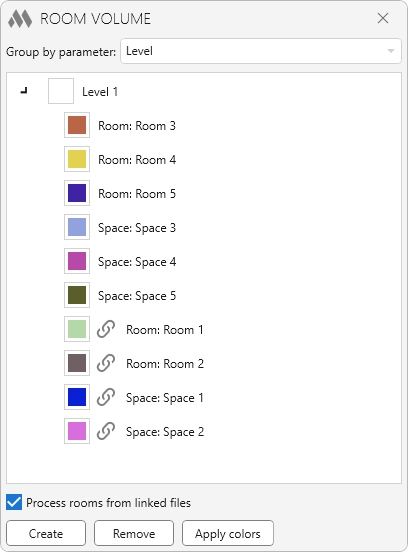
Process rooms from linked files – option that allows to show the volume of rooms and spaces from linked files. Before the names of such rooms and spaces  is specified in the volume views tree.
The Create button has six commands:
- (Re)create for all Rooms and Spaces – removes all previously created volume views and creates new ones for all placed rooms and spaces.
- (Re)create for all Rooms – removes all previously created volume views and creates new ones for all placed rooms.
- (Re)create for all spaces – removes all previously created volume views and creates new ones for all placed spaces.
- Create missing (Rooms and Spaces) – creates volume views for all rooms and spaces, for which no volume view was created before.
- Create missing (Rooms) – creates volume views for all rooms, for which no volume view was created before.
- Create missing (Spaces) – creates volume views for all spaces, for which no volume view was created before.
The Remove button has two commands:
- Remove all volume views – removes all volume views created by the plugin (all that are displayed in the tree).
- Remove volume views without the source Room and Space – removes all volume views not associated with the placed room and space (i.e., when the source room or space has been deleted).
The Apply colors button allows you to apply graphics settings on the current view to all room volume views.
Depending on the selected grouping option, the views are displayed as a tree. The views are grouped according to the value of the associated room or space parameter.
You can change the color for each grouping as a whole and for the volume view individually:
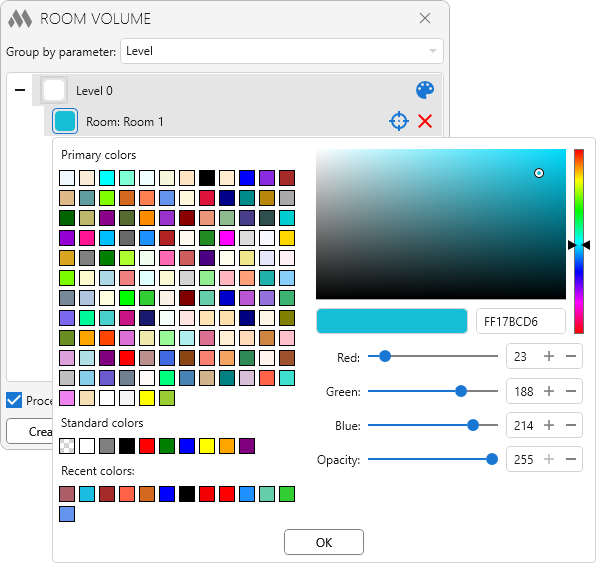
If you put the mouse cursor over the tree elements, additional commands appear:
 – set random colors for all volume views of rooms and spaces in the group
 – selecting the view of the volume of room or space and shows it in the center of the screen
 – remove the volume representation from the model.

 YouTube