
Copy crop extents

Copy crop extents
Show in Revit

Several Revit applications are running. Choose one:

This is a free plugin!
Copying the crop extents of the current view into the specified views

Icon

mprCopyCropBox_32x32 mprCopyCropBox_16x16 mprCopyCropBox_32x32_dark mprCopyCropBox_16x16_dark

Related news and articles


Using

When you start the plugin, a window appears for selecting the views to which the crop extents from the current active view can be copied:
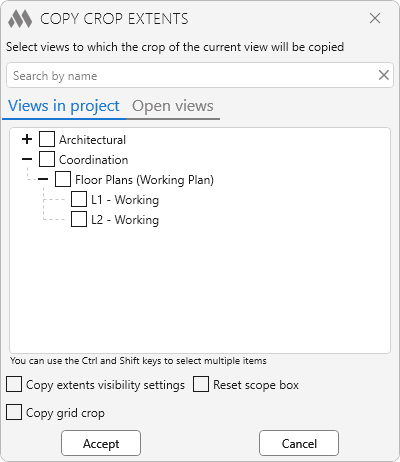
1

For 2D views (floor plans, sections, etc.), the selection tree displays views whose view direction is identical to that of the current active view. If the current view is a 3D view, the tree displays all 3D views. The contents of the list also depend on the Reset scope box option.

Copy extents visibility settings – sets the "Crop View", "Crop Region Visible", and "Annotation Crop" parameters to the same values as those of the current active view.

Reset scope box – when enabled, the selection tree also displays views with a scope box assigned. When processing these views, the "Scope Box" parameter is reset to "None". When disabled, such views are not displayed in the tree.

Copy grid crop – when copying grid crop extents, the view crop region is temporarily disabled and all view breaks are removed.

Copy 3D View Section Box – additionally copies the section box extents for 3D views.

Copy height only – copies only the crop height for "Section" and "Elevation" views. The crop width remains unchanged.

Accept – copies the crop extents to the checked views.

Cancel – cancels the plugin operation.

ModPlus YouTube
New
Added the ability to reset the scope boxes of views
Improved
The interface was migrated to the current version of the ModPlus styling library
Fix
Fixed a bug when copying the crop region of sections
Improved
The dependent view processing algorithm has been updated
New
Added the ability to copy only the crop height of views for sections and elevations
New
Changed the processing of dependent views. Dependent views are now grouped with the parent in the view selection tree. When selecting the parent, crop copying is applied to all dependent views
Improved
Fixed the logic for copying the crop shape. A rectangular crop is copied without converting to a sketch, a custom shape is copied as a sketch
Fix
Fixed an error in checking pinned views
Improved
Added consideration of pinned views
New
Added multiple selection in the tree view of elements
Fix
Fixed an error occurring when copying grid cropping if the grid does not intersect the level
Improved
Added handling of rotation of the source and target views
New
Added tabs "Open Views" and "Views in Project"
New
Added view search by name
New
Added ability to copy grid crop regions
Fix
Fixed incorrect handling of dependent views
Fix
Fixed some bugs
New
Processing of target views with activated temporary view properties
Fix
Fixed "Attempt to modify the model outside of transaction" error when copying 3D view Crop Box
Improved
Changed icons
Improved
Added command access settings on the ribbon
New
Copying the crop extents of plans, taking into account the rotation