


Product insert

| Name | Discount | Total value of individual orders | Total value of corporate orders |
|---|---|---|---|
| Regular user | 0% | ||
| 3% discount | 3% | $84 | $180 |
| 5% discount | 5% | $120 | $360 |
| 7% discount | 7% | $180 | $600 |
| 10% discount | 10% | $300 | $900 |
| 15% discount | 15% | $360 | $1 200 |
| Partners | 30% | ||
| BIM Consulting | 50% | ||
| Super VIP | 100% |
Call options
- ModPlus floating menu or palette
- AutoCAD ribbon
- Command line: _mpProductInsert
Icon


Related news and articles
- Set up your own base of products!
- New features in the "Products" section
- AutoCAD. Updating the "Specifications" plugin and removing the "Normative base" plugin
Using
Creating AutoCAD blocks based on data from the database. Extended data is added to the blocks, which allows processing these blocks with other plugins and creating a specification based on them.Extended data can also be added to ordinary AutoCAD entities.
Important! Blocks must be inserted with this plugin or copy already inserted, otherwise (when inserted by normal means AutoCAD), extended data will not be added!
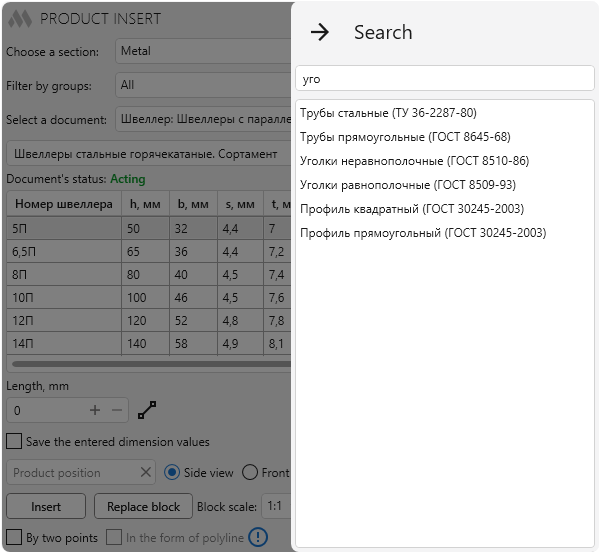
There are two additional buttons in the window title bar:
 – opens the search panel for documents in the database:
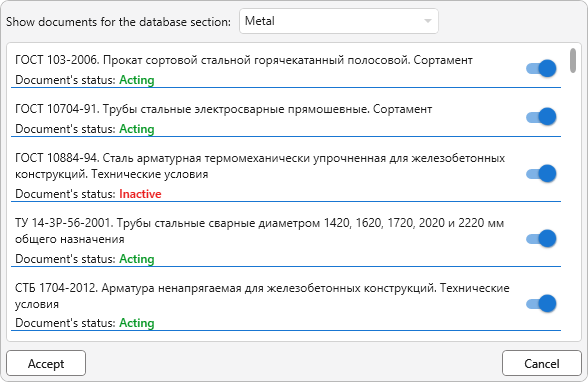
 – opens a window for editing the list of documents used by the plugin. If you do not want to use any document from the database, then simply disable it:
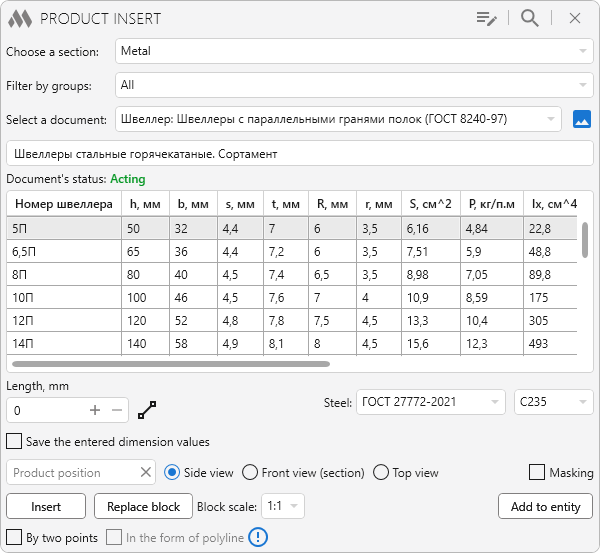
The main window of the plugin contains the following parts (top to bottom):
Choose a section – drop-down list to select the database section (Reinforced concrete, Metal, Wood/Plastic, Materials, Other).
Filter by groups – allows you to filter the displayed documents into groups. For example, blocks, rolled products, etc.
Select a document – drop-down list of documents in the selected section.
 |
– open image for this document, if available in the database. |
Below is the name of the selected document and a table for selecting products with their characteristics. The status of the document is displayed to the right of the name of the document: Acting, Inactive, No information or legislation.
Under the table are the properties of the products that must be specified. Properties change depending on the selected document.
Product position – indication of the position of the product. Optional parameter required for filling specifications later.
Side view, Front view (section), Top view – option to display the product when inserting it as a block.
Masking – when you select an option, a masking AutoCAD element will be added to the block, to hide objects behind the block.
Insert – go to AutoCAD to indicate a point (if the selected document does not support product rendering, the button becomes inactive).
Insertion point: – specifies the point to insert the block. A block with a simple product geometry, drawn by the values of the specified element in the table (or by the values selected in the drop-down lists of properties) will be inserted at the specified point.
When a plugin inserts a block into a block, extended data is written with all the properties of the product. This advanced data will be used in processing by other plugins. During normal block copying, extended data is saved. However, if this block is reinserted using standard AutoCAD tools (Insert -> Block), the block will NOT have extended data and, accordingly, will not be processed by other plugins!
Replace block – go to AutoCAD to select a block.
Choose a block to replace: – block selection in the drawing. The selected block will be deleted, and a new block with advanced data will be inserted in its place (see the work by pressing the button Insert).
Add to entity – go to AutoCAD to select a entity.
Select the objects to which you want to add data for the product: – the choice of any entity. Advanced data with information about the specified product/material will be added to the selected entity.

 YouTube