


Rebar solid and visible

Several Revit applications are running. Choose one:
Icon


Related news and articles
Using
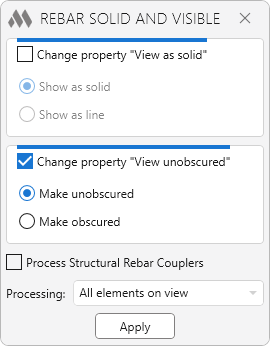
Change property "View as solid" (only for Revit 2017-2022) – this group contains options for changing the property of the rebar "View as solid". The group is available only when launched in a 3D view, since the "View as solid" property can be changed only in a 3D view. The inclusion of this group indicates that the "View as solid" property of the processed reinforcement will change.
Show as solid / Show as lines – indicates the position to set the "View as solid" property.
Change property "View unobscured" – this group contains options for changing the property of the rebar "View unobscured". The inclusion of this group indicates that the "View unobscured" property of the processed reinforcement will change.
Make unobscured / Make obscured – indicates in which position the "View unobscured" property should be set.
Process Structural Rebar Couplers – if this option is enabled, the plugin will also process elements of the "Structural Rebar Couplers" category.
Processing: – a drop-down list with four options for selecting the reinforcement:
- Selected element – it is required to select one host element containing the reinforcement. You can select the reinforcement directly.
- Selected elements – it is required to select several host elements containing reinforcement. You can select the reinforcement directly.
- All elements on view – all host elements and reinforcement in the current view will be processed.
- All but selected elements on view – all reinforcement on the view will be processed except for the selected elements. The selected elements can be both reinforcement and host elements. I.e., if a host (e.g., wall) is selected, then all reinforcement in that host will not be processed.
Apply / Continue – change the properties of the reinforcement in the current view or go to the selection of elements.