


Batch Sheets Export

| Name | Discount | Total value of individual orders | Total value of corporate orders |
|---|---|---|---|
| Regular user | 0% | ||
| 3% discount | 3% | $84 | $180 |
| 5% discount | 5% | $120 | $360 |
| 7% discount | 7% | $180 | $600 |
| 10% discount | 10% | $300 | $900 |
| 15% discount | 15% | $360 | $1 200 |
| Partners | 30% | ||
| BIM Consulting | 50% | ||
| Super VIP | 100% |
Call options
- Renga main menu
Icon


Related news and articles
- New plugin for Renga: Batch Sheets Export
- Renga. Batch Sheets Export 2.0. Export by sections, pdf merge and sheet sets
Using
The plugin window includes 2 tabs: By sheet and By section.
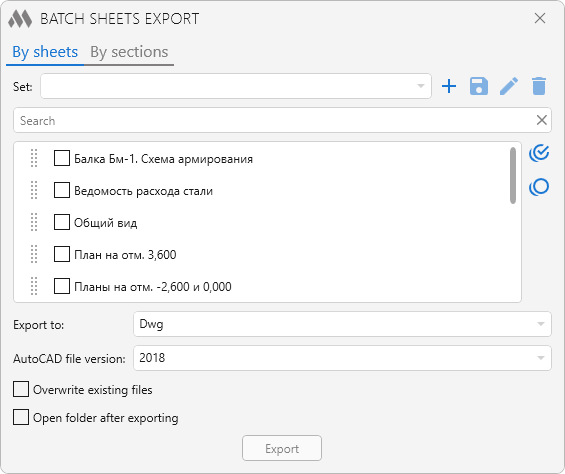
BY SHEETS
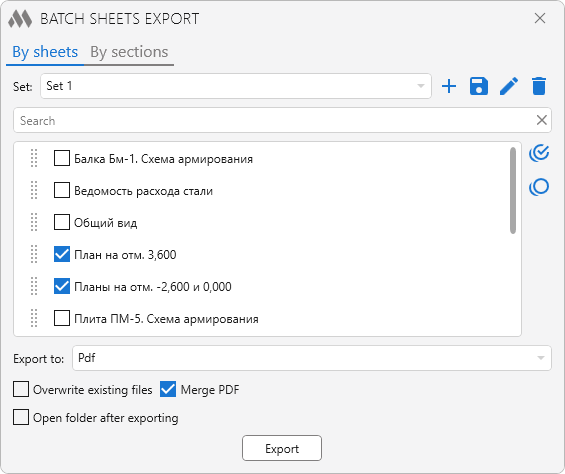
This tab displays all sheets of the current project. Sheets in the list can be moved by dragging them with the mouse.
To the right of the list there are auxiliary buttons that allow you to select all displayed sheets in the list or unselect all displayed sheets in the list.
Above the list is a field for a quick search by sheet name, as well as a drop-down list of the current document sets with the following set control buttons:
 – save the current list of sheets as a new set
 – save changes to the current set
 – rename the current set
 – delete the current set.
Sets save the position of sheets in the list and the state (checked/unchecked). Sets are saved with binding to the project file name – each project will display its own list of sets.
Export settings are located in the lower part of the tab window:
- Export to – export option: dwg, dxf, pdf, oxps
- AutoCAD file version – select the AutoCAD file version the sheets will be exported to if export in dwg or dxf is selected
- Overwrite existing files – if the option is checked and the export folder contains files with the same name as the sheet to be exported, the file will be overwritten. If not checked and the destination folder contains files with the same name, a suffix will be added to the name of the sheet to be exported
- Merge PDF – if this option is enabled, the checked sheets will be exported to a single pdf file with the project name. The sheets will be arranged in the order in which they are presented in the list.
- Open folder after export – if this option is enabled, the folder where the export result was saved will be opened after the export is completed
Export – select a folder for export and start batch export of sheets
BY SECTIONS
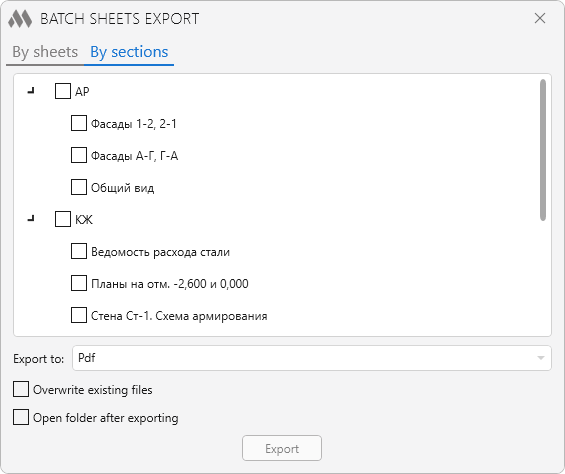
On this tab, the sheets of the current project are shown, grouped by sections.
Export is available to dwg, dxf, pdf, or openXps formats. Individual sheets can be excluded from export by clearing the corresponding checkboxes.
When exporting to dwg and dxf, a separate folder named after each section is created automatically, and each sheet is saved as a separate file.
When exporting to pdf or openXps, one file is generated for each section, containing all selected sheets of that section.