
Formats

Formats
This is a free plugin!
Inserting drawing formats according to GOST 2.301-68/ISO 216

Call options

  • ModPlus floating menu or palette
  • AutoCAD ribbon
  • Command line: _mpFormats

Icon

mpFormats_32x32 mpFormats_16x16 mpFormats_32x32_dark mpFormats_16x16_dark

Related news and articles


Using

Formats are inserted in the form of a block with a special label in the extended data. A label in the extended data is required to define the formats with other plugins (for example, Sheet Numbering). Therefore, you should not insert the formats with standard means of inserting a block into AutoCAD. Plugin allows you to add title blocks to the format – for this you need to install and at least once started the plugin Title blocks.

GOST 2.301-68
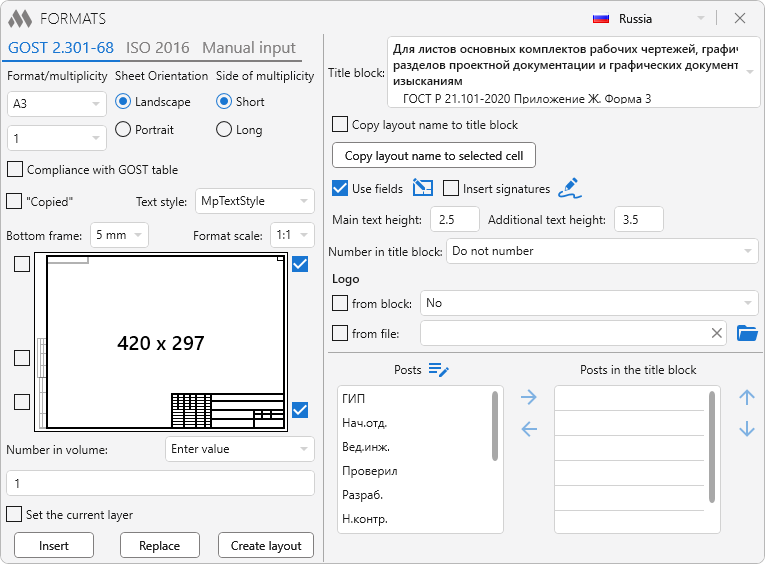
1

Format/multiplicity – drop-down lists for selecting the format and multiplicity by GOST.

Sheet orientation – format orientation – portrait or landscape.

Side of multiplicity – specifies the side by which the format will be increased if the multiplicity is greater than one.

Compliance with GOST table – the sizes of formats at multiplicity more than 1 are taken by multiplication of the parties of a format with multiplicity 1 on size of multiplicity that corresponds to limiting deviations in table 3 (paragraph 6). When you check the box, the sizes of the formats will be taken in full accordance with table 2 (paragraph 5). For example, the format A4x5 without the check mark will be 297x1050, and with the check – 297x1051.


ISO 216
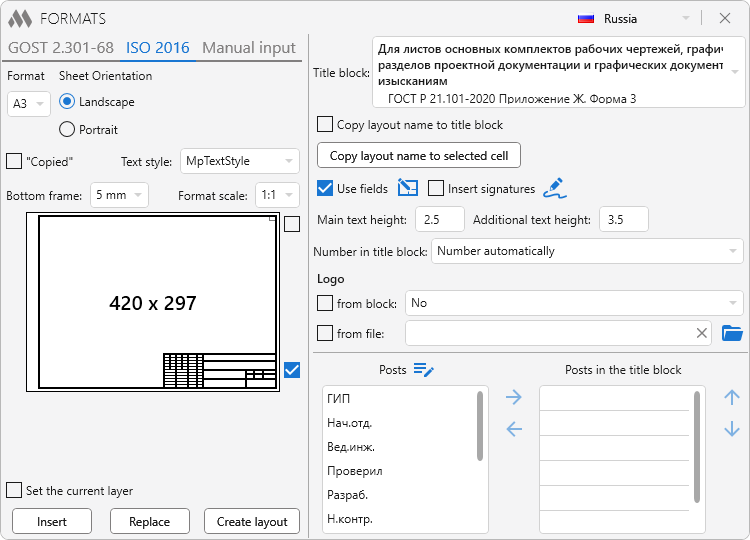
3

Format – drop-down list for selecting the format.

Sheet orientation – format orientation – portrait or landscape.


Manual input
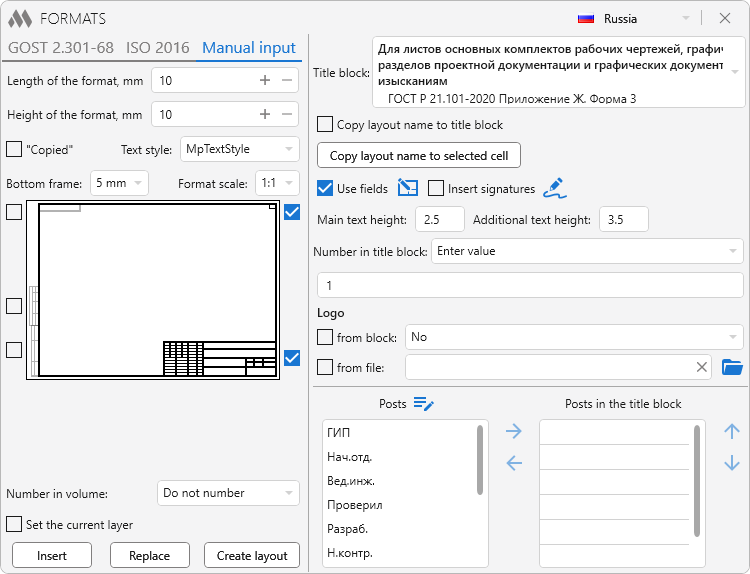
2

Lenght of the format, mm – field for entering the length of the format in millimeters.

Width of the format, mm – a field for entering the width of the format in millimeters.


General properties

"Copied" – adds to the label the inscription "Copied".

Text style – setting a text style that will be used for text in the format and stamp.

Bottom frame: 5mm or 10mm – choose the bottom frame for A3 and A4 formats.

Format scale: – scaling formats when inserting. Read more in article.

Number in volume – selection of the numbering option in the volume number field: Do not number, Number automatically, Enter value.


Content of the format

On the graphical representation of the format you can specify additionally added data - side inscriptions, a field for the page number in the volume and a stamp.
When the "Stamp" check box is selected, the controls for setting the stamp are displayed in the right part of the window. Settings are similar to the plugin Stamps. Additionally, the following options are available:

Copy layout name to the selected cell – switch to AutoCAD to select the cell where the sheet name will be inserted:
Specify point inside table: – specify a point inside the cell.

Number in title block – selection of the numbering option in the title block: Do not number, Number automatically, Enter value.


Buttons

Insert – go to AutoCAD to select the insertion point:
Insertion point: – specifying the insertion point. 

Replace – go to AutoCad to select the format and replace it with the current one:
Choose a replacement format: – selecting the block. The block must be a format created by this function previously. 

Create layout – create a new layout with an insert in it.

ModPlus YouTube
ModPlus YouTube
Improved
The interface was migrated to the current version of the ModPlus styling library
New
Added the ability to number drawing formats in the volume and in the title block
New
Added the ability to insert the current sheet name into the title block
Fix
Fixed an error where previews for the side and top additional elements of the drawing format were not displayed
Fix
Fixed an error that occurred when editing posts
Improved
Removing start and end spaces from the Layout name
Fix
Fixed an error occurring when inserting a stamp if the current layer is locked
Improved
Amended due to the replacement of title blocks according to GOST R 21.1101-2013 with title blocks according to GOST R 21.101-2020
Improved
Zero horizontal indent for cells with dates in title blocks
Fix
Do not run the "Signatures" command for side stamps
Improved
Added an additional check for the presence of a stamp file when inserting a format
Improved
Added the ability to disable the logo from a block or from a file to use fields
Fix
Fixed the error of replacing a format with a 5 mm bottom frame with a format with a 10 mm bottom frame
New
Added the ability to use the "Signatures" function from the "Title blocks" plugin when creating a format with a title block
New
Added processing of fields taking into account the width factor
Fix
Fixed naming of the blocks for A3, A4 formats
Improved
Corrections based on changes to the title blocks file storage folder
FIX
Added new field – the date used in title blocks, containing posts
FIX
Fixed eSelfReference exception that occurs when insert a logo in the title block from the file
FIX
Added formats by ISO 2016
FIX
Added ability to set stamp by ISO 7200:2400
FIX
Added the ability to specify the multiple dimensions of formats compliance table GOST
FIX
Added check for blank value is entered the layout name
FIX
Added the ability to apply the current layer to create tables and block
FIX
Fixed problem adding not valid (empty name) text style to the list of text styles
FIX
ModPlusStyle styling
FIX
Replacement of main function icons adding icons for dark themes the AutoCAD ribbon
FIX
Amendments have been made in connection with the updating of side markings in accordance with GOST 21.1101-2013 Appendix Zh
FIX
Fixed a fatal error when opening the Function window
FIX
Added processing of stamps for Ukraine (DSTU B A.2.4-4: 2009) and Belarus (STB 2255-2012)
FIX
Amendments to store base stamps in one file
FIX
Added a repetition of the angle of rotation model formats the replacement of mats
FIX
Corrections according to the changes of the stamp on the form 5 (GOST 21.1101-2013)
FIX
Fixed the cell to insert the sheet name in stamp form 4 (GOST 21.1101-2013)
FIX
Added landing mats on layer "0" when insert or replace
FIX
Added the ability to set the scale Formats (user request)
FIX
Added the same version 1.1.3.4 function Stamps
FIX
Added the display window size of the selected format
FIX
Added saving the selected orientation of the side multiplicity
FIX
Added the ability to insert the sheet name and number in the stamp when creating a new sheet (if the stamp supports insertion)
FIX
Removed ability to resize the window
FIX
Fixed error when reading the settings when you first start
FIX
From the list of blocks for the logo removed anonymous blocks
FIX
Various small changes
FIX
Removed annotation list newly created blocks formats
FIX
Added graphical representation of mats
FIX
Added the ability to add side labels
FIX
Added the ability to add stamp using fields (according to the principle of function Stamps)
FIX
Added the ability to specify the worksheet name when you create a new sheet with format key
FIX
Removed automatic creation of text style MpTxtStyle
FIX
Added ability to set text style (like the mats and stamps)
FIX
Various small changes