Sheet numbering

Sheet numbering
Attention! The plugin is purchased for the specified version of AutoCAD!
$7.20
Discount system: 0%
Discount system
Name Discount Total value of individual orders Total value of corporate orders
Regular user 0%
3% discount 3% $84 $180
5% discount 5% $120 $360
7% discount 7% $180 $600
10% discount 10% $300 $900
15% discount 15% $360 $1 200
Partners 30%
BIM Consulting 50%
Super VIP 100%
A subscription is your best choice. Find out why!
To use the purchased license, use the Personal Area of the ModPlus software installed on your computer
Setting sheet numbers in the document and volume in ModPlus formats and title blocks

Call options

  • ModPlus floating menu or palette
  • AutoCAD ribbon
  • Command line: _mpSheetNumbers

Icon

mpSheetNumbers_32x32 mpSheetNumbers_16x16 mpSheetNumbers_32x32_dark mpSheetNumbers_16x16_dark

Related news and articles


Using

1

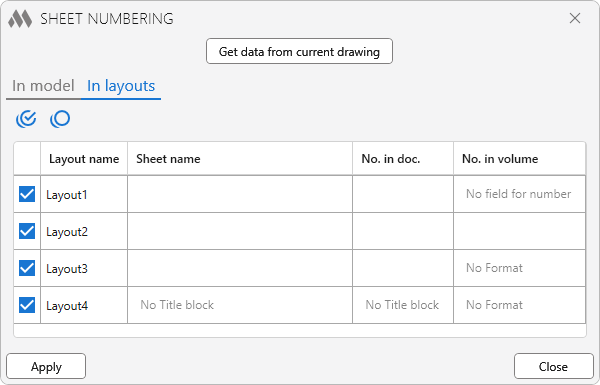
Plugin allows you to change the name and number of the sheet (values in the stamp) and the number of the sheet in the volume (the field in the upper right corner of the format).

Get data from current drawing – reading data from the current drawing, depending on the selected tab – in the model or in layouts. To search in model, you must first go to the model.
Data retrieval occurs by formats and stamps created by the ModPlus plugin. Depending on the presence of a format and/or a stamp in the list, the fields for indicating the name of the sheet, the number in the document and the number in the volume become active.

checkbox multiple marked circle outline – check all the sheets in the list.

checkbox multiple blank circle outline – uncheck all the sheets in the list.

Apply – all values for sheets marked in the list will be recorded in stamps and formats. For formats, the number in the volume is added as a block attribute.

Close – close the window without applying changes.

ModPlus YouTube
Improved
The interface was migrated to the current version of the ModPlus styling library
Fix
Fixed a bug that occurs when trying to check all/uncheck all when the sheet list is empty
Improved
The sheet selection checkbox has been replaced with buttons to select and deselect sheets
Improved
Setting the width factor and oblique from the current text style to the created attribute of the number in the volume
Improved
Amended due to the replacement of title blocks according to GOST R 21.1101-2013 with title blocks according to GOST R 21.101-2020
FIX
Fixed eNullObjectId exception, which could occur in earlier supported versions of AutoCAD
FIX
Added usage of user coordinate system when you search for formats with stamps in model space
FIX
Added the ability to sort formats by the coordinates obtained from model space
FIX
ModPlusStyle styling
FIX
Replacement of main function icons adding icons for dark themes the AutoCAD ribbon
FIX
Fixed a bug in the order of numbering from the specified cell down
FIX
Fixed a fatal error when opening the Function window
FIX
Changes made to prevent e On Locked Layer error when making changes to tables
FIX
Added handling of the dies according to the standards of Ukraine (DSTU B A. 2.4-4:2009) and Belarus (STB 2255-2012)
FIX
Changes with changes of stamps in form F5, F9, Ф9а according to GOST R 21.1101-2013
FIX
Fixed errors when processing some stamps
FIX
Added the ability to specify the worksheets which you want to make changes
FIX
Some bugs fixed
FIX
Changes in the processing of data according to forms 4, 5 (GOST 21.1101-2013)
FIX
Added processing of forms 9, 9a (GOST 21.1101-2013)
FIX
Fixed bug when clicking "Apply" in the absence of data for the application
FIX
Attribute, are added to the block mats of the specified text height 3
FIX
Changed progress bar color to the color of the current theme