Smart

Smart
Attention! The plugin is purchased for the specified version of AutoCAD!
$7.20
Discount system: 0%
Discount system
Name Discount Total value of individual orders Total value of corporate orders
Regular user 0%
3% discount 3% $84 $180
5% discount 5% $120 $360
7% discount 7% $180 $600
10% discount 10% $300 $900
15% discount 15% $360 $1 200
Partners 30%
BIM Consulting 50%
Super VIP 100%
A subscription is your best choice. Find out why!
To use the purchased license, use the Personal Area of the ModPlus software installed on your computer
Create smart objects that extend the capabilities of AutoCAD, as well as allow to perform design according to state standards (ISO)

Call options

  • AutoCAD ribbon

Icon

mpESKD_32x32

Disclaimer

This plugin is an experimental development and may cause unforeseen errors when working with the drawing. In case you have problems working with the plugin, we strongly recommend writing to us and providing as detailed information as possible about the identified problem.

If the plugins do not allow you to continue working, it is recommended to disable it using the Configurator.

It is currently known that the plugin does not work in AutoCAD Mechanical


Related news and articles


Using

The basic principle of creating smart entities is based on the use of anonymous blocks filled with advanced data (XData). With a plugin, such blocks will work as smart entities, and if not, they will simply be anonymous blocks. This approach allows you to get away from using Custom Entities that create proxy objects in the drawing and, if necessary, allows anonymous blocks to be simply disassembled, turning them into ordinary entities.

smart entities are not annotative, but have the property Scale.

For all smart entities, the command is present in the context menu Create analog, allowing you to create a smart entity with properties similar to the selected entity.

The plugin creates a separate tab Smart on the ribbon, which contains various panels with commands that create smart entities, and panels with common commands:

Properties 32x32 Properties 32x32 dark – opens the palette of properties of smart entities, if it is not open.
StyleEditor 32x32 StyleEditor 32x32 dark – opens a window for managing the styles of smart entities and basic settings.
SearchEntities 32x32 SearchEntities 32x32 dark – runs the command «Search for smart entities».

Properties palette

All smart entities have various properties, the editing of which is available in the property palette:
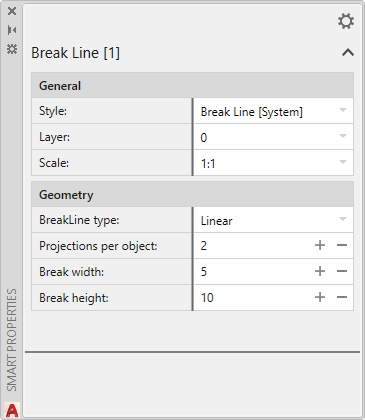
7

It is not recommended to change the properties of blocks (except for general properties: color, layer, line type, etc.) through the standard AutoCAD properties palette, as this may lead to incorrect operation of the smart entity!

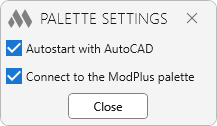
12 – opens the properties palette settings window:

8

Attention! If you enabled the option Connect to the ModPlus palette, make sure that the ModPlus palette is enabled in the main settings. Otherwise, the properties palette will not be displayed.!


Style editor
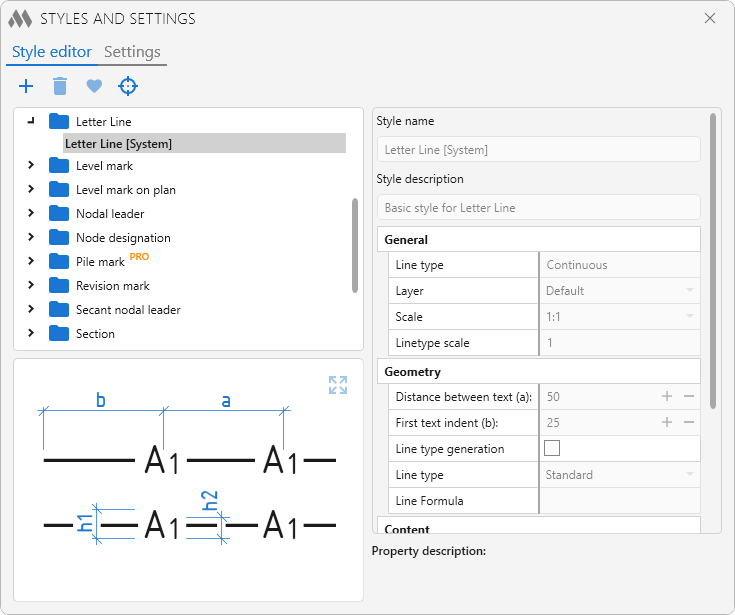
1

The style of a smart entity is a collection of values of the properties of an entity that are applied to the entity when it is created. You can also change the style through the property palette.

Each smart entity has a system style, the values of which can be viewed, but not edited. For each smart entity, you can create a custom style..

All user styles are stored in the user settings folder %APPDATA%\ModPlus\UserData\Styles and are available for backup through Personal account.

The following commands are present at the top of the style editor:

2– add a new style for the selected entity.
3 – deletes a custom style highlighted in the list.
4 – setting the default highlighted style. The default style in the list is displayed in bold. The default style can also be set by double-clicking on the style in the list.
5 – creating a new custom style based on the selected smart entity. The plugin will determine the type of the entity and create a style in the desired category in the list of styles, setting the property values for it from the selected entity.

Settings
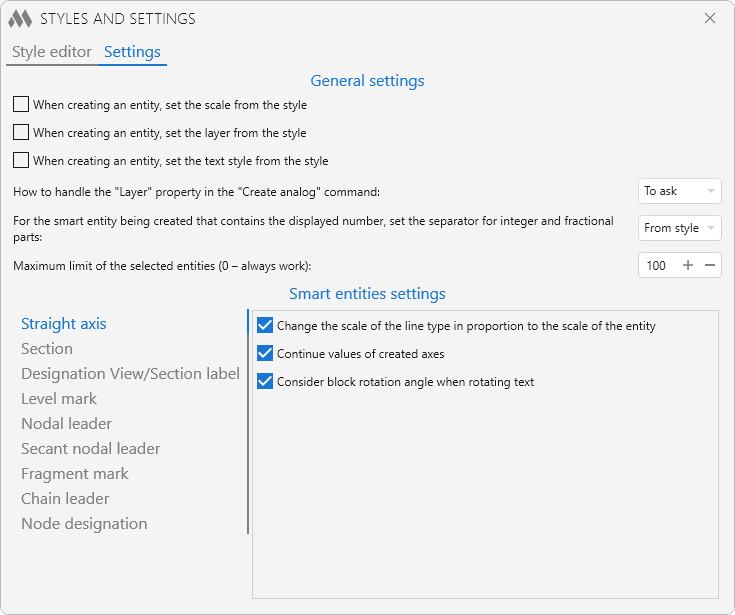
6

Settings are divided into two groups: general settings and smart entities settings.

General settings:

When creating an entity, set the scale from the style – when this option is enabled, the scale specified in the style will be set for the created smart entity. If the option is disabled, then the current annotative drawing scale will be set to the smart entity.

When creating an entity, set the layer from the style – when this option is enabled, the layer specified in the style will be set for the created smart entity. If the option is disabled, then the current drawing layer will be set to the smart entity.

When creating an entity, set the text style from the style – when this option is enabled, the text style specified in the style will be set for the created smart entity. If the option is disabled, then the current drawing text style will be set to the smart entity. The option is relevant for smart entities that have text content (Straight Axis, Section, Level Mark, etc.).

The layer and text style are saved in the style of a smart entity with all the information sufficient to recreate them. If the drawing does not have the desired layer or text style, then they can be created when creating a smart entity.

For the smart object being created that contains the displayed number, set the separator for integer and fractional parts: – selects the integer and fractional separator used in the displayed numeric values of smart entities that contain numeric values. For example, the Level "Mark smart" entity.

Maximum limit of the selected entities (0 - alway work) – the number of entities at which the palette will not process them. It is not recommended to set 0. Explanation: when an entity is selected in the drawing and the palette is open, then extended data is read and presented in the palette. When there are not many entities selected, this process occurs rather quickly. But the more entities there are, the more noticeable the performance will drop. For example, you want to copy 100 entities and when you select them, it will take time to read data, which is not required by the user. To solve the problem, a maximum has been added to the palette, upon reaching which the palette simply will not process the selected entities.

smart entities settings:

Various smart entities may have additional settings. For example, displaying auxiliary geometry when selecting a Section or Level Mark. On the left, you can select a smart entity containing additional settings, and a list of settings will be displayed on the right. When you mouse over each option, a pop-up notification is displayed with an explanation.


Search for smart entities
9

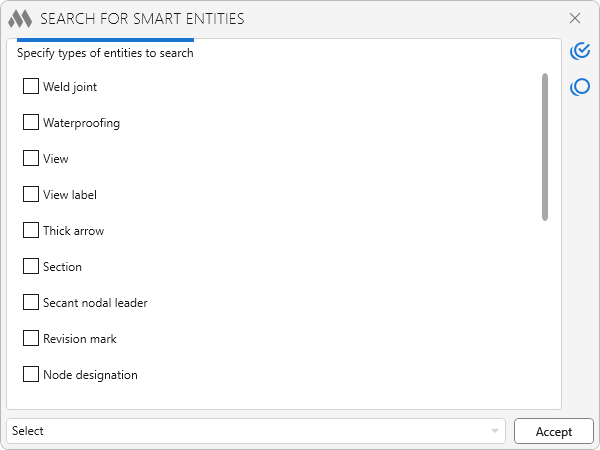
The command allows you to find in the drawing all the smart entities of a certain type and apply the specified action to them.

10 – selection of all types of smart entities in the list.
11 – selection all types of smart entities in the list.

In the lower part of the window there is a drop-down list with options for the applied action to the found entities:

  • Select – selection of found smart entities in the drawing.
  • Remove data – removing extended data from found smart entities in the drawing. After this action, smart entities will become ordinary anonymous blocks.
  • Explode – the division of the found smart entities into a component of simple geometry (lines, polylines, text, etc.).
  • Delete – delete found smart entities.

Search for smart entities by value and replacing values
13

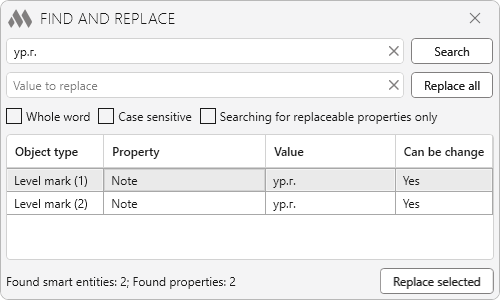
The command allows you to find all smart entities in the drawing, in the numeric or string properties of which the desired value is located, as well as to replace the values of the found smart objects, If the property of the smart object is editable.

The search result is displayed as a table containing the type of object, the searched value with the property in which it is located and the possibility of replacing it. All found objects can be added to the current selection. When selecting an object in the table, the object is zoomed (the current selection is reset!).

The replacement can be performed both for the values of all found smart objects and only for the values of the objects selected in the table.

ModPlus YouTube
Improved
Fixed some interface issues
Improved
The arrangement of the buttons on the ribbon was changed to make it more compact
Improved
Added the "Text style" property for the "Fragment mark" object
Fix
Fixed internal errors
Fix
Fixed an error in which the masking of the "Break Line" object did not change its layer when the object's layer was changed
New
Added support for the dark theme in the properties palette
New
Added launching of the main ModPlus palette if the properties palette is docked to it
Fix
The interface was migrated to the current version of the ModPlus styling library
Fix
Fixed a bug occurring in some documents when selecting table cells
Fix
Fixed a bug causing smart object property processing to be disabled when switching to the start tab for document selection
New
Added new smart object "Power Line"
Improved
Added a new arrow type "Simple Arrow with Tick" for the smart object "Arrow line"
Improved
Added the ability to mask one of the sides for the smart object "Break Line"
Improved
Added multiline support for the smart object "Multiline leader"
Improved
Added the ability to specify units of measurement in a separate column for the smart object "Multiline leader"
Improved
Added the ability to group saved rows of the smart object "Multiline leader"
Fix
Multiline leader: fixed a bug where lines could shift from their positions when using certain fonts
New
Added the ability to set text style for the "Multiline leader" object
Fix
Fixed a bug where the shelf width of the "Multiline leader" object could be calculated incorrectly
Fix
Fixed a bug due to which the smart object "Arrow line" was paid
New
Added new smart object "Polar Axis"
New
Added new smart object "Multiline leader"
New
Added new linear smart object "Arrow line"
New
Added the ability to change common properties for multiple types of smart objects at once
New
Added the ability to change the color of strokes and gaps in the "Waterproofing" object
Improved
A grip for changing the hole type has been added to the "Hole filling" smart object
Improved
The default hole type of the "Hole filling" smart object has been changed
Fix
Fixed a bug that prevented setting a smart object style as current immediately after creation
Fix
Fixed a bug occurring when entering an empty value in the linear smart object "Letter Line"
Fix
Fixed an error where a freeze occurred when attempting to change the creation mode of linear smart objects
Fix
Fixed an error that could occur with certain segment sizes in waterproofing
Fix
Fixed a translation error where only the "Arc" option was displayed when creating linear SMART objects
Fix
Fixed an error that occurred when using certain text styles
Fix
Fixed an issue where the content might be displayed incorrectly in some text objects
Fix
Weld designation: fixed a bug where some arrow type values could not be selected
Fix
Weld designation: fixed a bug where some property values could not be deleted
Improved
Dip mark: added option to choose between truncation and rounding of the dip summary value
Improved
Dip mark: added ability to display tail zeros
New
Added a new smart object "Weld designation"
New
Added a new smart object "Weld Leg"
New
Added a new smart object "Hole Filling"
Improved
Dip mark: added ability to override text
Improved
Search: only object types present in the current drawing are now displayed in the list of smart objects
Improved
"Smart properties" item has been added to the context menu
Fix
Letter Line: fixed a bug where text was incorrectly displayed after mirroring
Improved
Optimization of smart object regeneration when executing ROTATE and MIRROR commands
Fix
Fixed an error in the "Waterproofing" object related to the indentation from the end of the segment.
Fix
Fixed incorrect rendering of closed linear objects
Fix
Fixed some errors occurring when rendering linear objects
New
Added the ability to change the segment type of linear objects to arc segments
New
Added a new smart object (PRO) "Insulation"
Improved
Redrawing smart object graphics when PLOT command is started
Fix
Values with an underscore in the name are displayed correctly in property palette drop-down lists
Improved
Crested leader: the maximum allowed value for text indentation has been increased
Improved
Crested leader: added "Text is always horizontal" option
Fix
Chain leader: correct position of the mirror grip at scales other than 1:1
Fix
Node mark, Secant node mark: correct sheet number indentation when using shx font.
Fix
Correct color handling when saving and loading layers
Fix
Crested leader: fixed a bug where minimum distances were not correctly taken into account when specifying the scale
New
PRO version
New
Added new smart object (PRO) “Pile Mark”
New
Added new smart object “Crested leader”
New
Added new smart object “Dip mark”
New
Added “Find and replace” command (instead of “Search by value” command)
Improved
Added copying of line color and thickness when creating a analogy
Improved
Node designation: added double-click editor
Fix
Level mark on plan: fixed a bug where it was not possible to set a mark value greater than 5 through the properties palette
Fix
Letter line: fixed text spacing at scale
Improved
Level mark: added ability not to create a bottom shelf
Fix
Fixed error of processing text that does not have text style set
New
Added new smart object "Revision mark"
New
Added new smart object "Node designation"
Improved
Using auxiliary graphics when moving points of linear objects
Improved
Secant nodal leader: added possibility to set text indent
Improved
Correct processing of multi-line text borders
Fix
Fixed window design in dark design themes
Fix
Fixed a bug where it was possible to run search commands multiple times
Fix
Fixed a bug in changing the direction of linear objects that are scaled to a different scale
New
Added new smart object "Concrete joint"
New
Added new smart object "Thick arrow"
New
Drawing only the last segment when creating linear objects
Fix
Fixed a bug where some smart objects remained in the drawing when the command to create them was canceled
Fix
Fixed some errors in the operation of linear objects
Fix
Corrected link to the help page
Fix
Fixed the position of the grips for leaders in the smart object "Level mark on plan"
Fix
Corrected incorrect minimum distance for shelf indentation in Chain Leader at scales less than 1:1
New
Straight axis: added block rotation accounting when rotating text (disabled in settings)
New
Added a text alignment grip for all smart objects with two lines of text
Fix
Straight axis: fixed an error which caused text to shift when specifying a rotation angle
Fix
Nodal leader and Secant nodal leader: correct text positioning when mirroring
Improved
Set the current text style of the document, if the text style is not set from the style of the smart object
Fix
Fix some bugs
New
Added new smart object "Chain leader"
New
Added double-click editing window for the "Weld joint" smart object
Improved
Updating smart object graphics in a model when using the REGEN command
Fix
Fixed an error which caused the grips of the "Level mark" smart object to be displayed incorrectly
Fix
Fixed an error which caused the text background to be incorrectly displayed on the left side of the "Level mark" smart object
Fix
Fixed a critical error that occurs when drawing a smart object "Straight axis"
New
Added new smart object "Level marker on the plan"
New
Added new smart object "View"
Improved
Added a grip to change the type of frame in the Nodal leader
Improved
Added the ability to change the level mark in the Level mark edit window
Improved
Added text mirroring when mirroring a Level mark, Axis, and Fragment marker
Improved
Forced redrawing of smart objects when switching to a layout without forced layout regeneration
Improved
Added forced regeneration when switching to a layout if there are smart objects on the layout
Improved
Forced redrawing of smart objects when switching to a layout
Improved
Taking into account the scale when drawing the ground line and waterproofing
Improved
Edits have been made to search for level marks by the displayed value
Improved
Offset of the grip to add a new vertex at the ends of linear objects
Improved
Added some improvements to the code
Fix
Fixed "This key is not in the dictionary" error that occurs when running the "Search" command
New
Added "Length" property for all linear objects
Improved
Changed the property order of the "Letter Line" object
New
Added new smart object: Letter Line
Fix
Removed the use of a static resource dictionary, which in some cases leads to errors when starting plugins
Fix
Fixed incorrect display of the name of the property that specifies the length of the middle half stroke of the cut
Improved
Added "Leader" property to the Fragment Mark, allowing to enable/disable the leader
Improved
Added property "Shelf height" to Level Mark
New
Added new smart object: View/Section label
Improved
A leader with text was added to the "Fragment mark" smart object
Fix
Added an icon for the dark theme for the "Fragment mark" command
New
Added new smart object: fragment mark
New
Added new smart object: weld joint
New
Added new smart object: secant nodal leader
New
Added the ability to add masking to hide the background for all objects with text
New
Node Leader: added value editor by double click
Improved
Nodal leader: for a round marker, the drawing order has been changed to account for passing through a point
Improved
Nodal leader: Added a new property "Text Always Horizontal"
Improved
The palette of properties of intelligent objects has been renamed to "ESKD Properties"
Improved
Added sorting in alphabetical order in the style settings window
Fix
Waterproofing: fixed the second line drawing error when zooming
Fix
Straight axis: fixed a bug where the position of landmark markers did not change
New
Added a new smart object - Nodal leader
Improved
Added the "Refresh Graphics" option to the "Find" function
Improved
Added property "Show asterisk" to Level mark
Fix
Fixed some bugs for Level mark
Improved
Rebuilding a ribbon tab after editing customization settings
Improved
Reopening the palette when changing the workspace (if the palette is not connected to the main ModPlus palette)
New
Added a new command "Search by value", which allows you to search for smart entities by the value of numeric or string properties
Improved
For the smart entity "Level mark" added property "Separator of integer and fractional parts"
Improved
For the smart entity "Level mark" added the "Text alignment" property and the "Note alignment" property
Fix
Fixed a bug where the text was displaced vertically in the "Level mark" smart entity when it was left-sided
New
Added a new smart object – Waterproofing
Improved
Added a new property object "Straight Axis" - rotation Angle of text
Improved
Changed icons for some commands
Fix
Fixed bug with alignment of Level Marks
New
Added new intellectual object: be the benchmark
Improved
Completely redesigned the properties palette
Improved
Minor corrections and improvements
Improved
Changed default values for palette settings
FIX
Fixed error running the command BEDIT at a pre-selected block
FIX
Ignoring error NotAllowedForThisProxy that occurs when drag grips of some dynamic blocks
FIX
Added update of existing intellectual entities when the document is opened
FIX
Check erased layers before using
FIX
Added setting of layer “0” for all entities inside the block of intellectual entity
FIX
Fixed the error of saving selected properties (drop-down list) when creating custom styles
FIX
Completely removed support for old data storage options of intelligent entities
FIX
Added accounting of the properties palette operation for entities located on the locked layer
FIX
Added the ability to create intelligent entities in the case that the current layer is locked
FIX
Fixed display name of the selected style in the properties palette
FIX
Added consideration styles that are not in current database of user styles
FIX
Added new command allowing to search the intellectual entities of the specified types
FIX
Error correction compatibility of entities created in different versions of AutoCAD
FIX
Changes in method of data storage in intellectual entities to improve the stability
FIX
Changed the linetype scale of the default entity "Straight axis" from 1 to 10
FIX
Changed the method of storing data in the entities, preventing damage of entities after run the command AUDIT (only for newly created entities or before the first editing entities)
FIX
Fixed bug in setting the current annotative scale for the created entity when disabled property "Set the scale from style"
FIX
Added handling properties "Layer" in "Create analog" command (configurable in the Editor styles in the settings tab)
FIX
Section: fixed offset of text when scaling Section by the standard command "Scale"
FIX
Section: Added the possibility of mutual offset of the text (can be enabled in settings window)
FIX
Section: Added a new property "Sheet number position"
FIX
Completely rewritten the function for later more quickly and efficiently adding intelligent primitives
FIX
Added helper team "to Create analog"
FIX
Added a new intelligent entity "Section"
FIX
Added a new object - Ground line
FIX
Fixed some bugs
FIX
Fixed a fatal error when building a Ribbon in AutoCAD 2013, 2014
FIX
Fixed a problem that caused a fatal AutoCAD error when working with some dynamic blocks
FIX
Fixed a bug duplicate tabs on the Ribbon
FIX
Changes are made in view of transfer of a folder of storage of the user settings
FIX
Replacement of the main icons of the function with the addition of icons for the dark AutoCAD ribbon design theme
FIX
The problem of displaying icons in the 2013 version has been fixed
FIX
The error of incorrect setting of the first value of the axis at different angles was fixed
FIX
The window for editing axis values has been added to change the position of the markers
FIX
Added a new intelligent primitive - a straight axis
FIX
The style editor is also added and the settings of the plugin
FIX
Many minor bug fixes
FIX
Fixed an issue that caused Auto CAD to freeze when working with a drawing with external references inserted when object snapping is enabled
FIX
Fixed a bug that leads to the disconnection of standard handles on AutoCAD tables
FIX
Added updated data in the properties palette when changing the current selection of primitives
FIX
Fixed the "eNotApplicable" error when editing tables