
View sync

View sync
Show in Revit

Several Revit applications are running. Choose one:

This is a free plugin!
Synchronize display coordinates of open views

Icon

mprViewSync_32x32 mprViewSync_16x16 mprViewSync_32x32_dark mprViewSync_16x16_dark

Related news and articles


Using

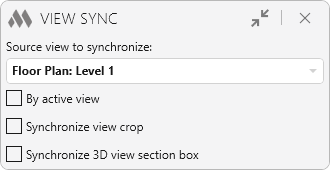
Plugin represents a small window placed on top of the Revit window:
1

The drop-down list shows the open views of the current document that are available for synchronization. The list dynamically changes when switching between views. After the source view for synchronization has been selected, when switching to other views, there will be synchronization to the source view. Synchronization means setting the same coordinates of the view rectangle (visible part). For 3D views, the view orientation also changes.

If By active view mode is enabled, the plugin will work cyclically according to the following algorithm: the active view becomes the source view for synchronization. When switching to a new view, the view is synchronized to the source view and the new active view becomes the source view for synchronization.

If the options Synchronize view crop and Synchronize 3D view section box are enabled, the view crop (for 2D views) and 3D view section box synchronization will additionally be synchronized, respectively.

Plugin supports processing of unlocked 3D views, plans, sections, elevations, sheets, drafting views, and legends. For all views except 3D views, synchronization occurs only when the line of sight coincides.

ModPlus YouTube
Improved
The interface was migrated to the current version of the ModPlus styling library
Fix
Fixed a synchronization error when switching from a 3D view
Fix
Fixed an error when synchronizing 3D views
Fix
Fixed an error in which some views were not synchronized
Fix
Fixed an error in which the compatibility of some views was determined incorrectly
Improved
Improved the algorithm for selecting views for synchronization
Improved
Window background change when collapsing window content
Improved
Do not synchronize views if one of the views is a sheet
Fix
Fixed a bug where the window width was incorrectly changed
Fix
Fixed a bug where open views were not added to the list of views
New
Added ability to minimize window contents
Fix
Fixed a bug where views continued to synchronize after closing the plugin
Fix
Fixed a bug where the plugin could not be re-run
Fix
Fixed a bug where it was possible to run multiple copies of the plugin
New
Added ability to synchronize view crop and 3D view section box
Improved
Correct switching between project and family documents
Improved
Using the ModPlus.Xaml.Behaviors.Wpf.dll library instead of Microsoft.Xaml.Behaviors.dll to resolve compatibility issues with other plugins
Improved
Disabled window closing by pressing Esc key