Compare with Web License Server

Available version 4.0.0.0

Download

https://youtu.be/bhr6rP8NVOw

When using the corporate license, Revit and AutoCAD include indication of the user's workplace usage. Read more in this article.

LAN License Server allows you to use one or more corporate subscriptions (multi-user licenses) for a certain number of ModPlus users on the network.

The license server must be running on one of the computers on the local area network (LAN) and enabled to listen on a specific port.

The license server accepts requests from end users, checks for availability in the license repository, and returns a response to the user with permission or prohibition on using the full version of the ModPlus plugins.


Server
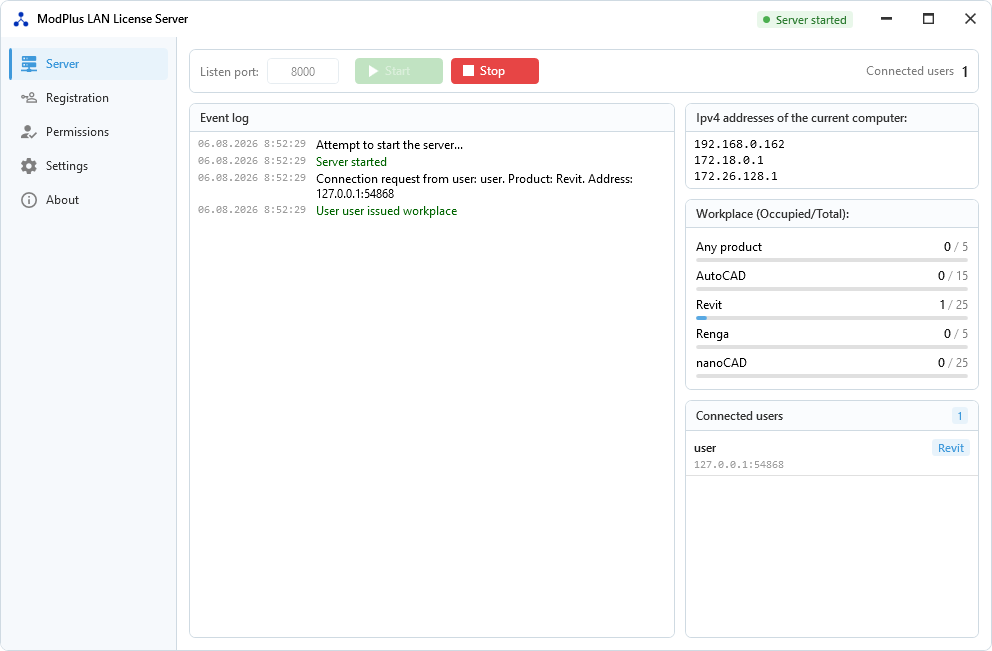
ServerTab

This tab launches the license server and displays basic information about the connected users and available workstations.

On the left side there is a server log output field.

The right side is located:

Ipv4 address of the current computer – a list of ipv4 addresses of the current computer. One of the list addresses must be specified in the end-user settings (described below). It is recommended to use the first address in the list.

Listen port – in this field you need to specify the port number on which the license server will accept requests from end users. The maximum allowable value is 65535. The same port value must be specified for all end users (described below).

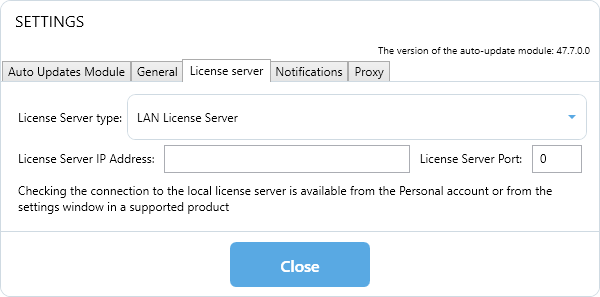
To allow end-users to connect to the license server, configuration must be performed on each computer. This can be done in the Auto Update Module in the Settings menu:
1

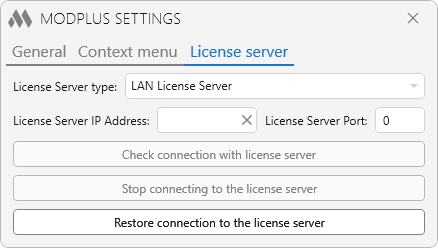
or in the ModPlus Settings of the supported product on the License Server tab:
10

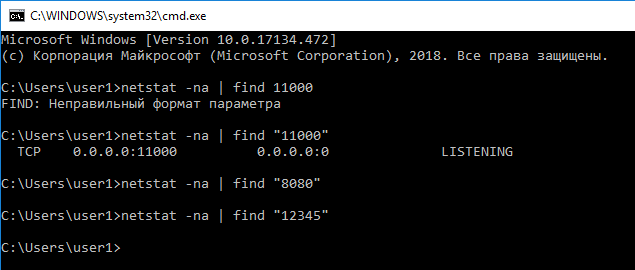
You can check the free port with the netstat –na | find “xxxx” (where xxxx is the port number) entered on the Windows command line. The following image shows the result - port 11000 is busy, ports 8080 and 12345 are free.
findPort

Start – start the server. When the button is pressed, the server will start listening on the local network on the specified port. After starting the server, it is impossible to change the port number.

Stop – stop the server. When you click the button, the server will stop listening to the network, and all connected clients will be disconnected.

Workplace – this field displays a list of possible jobs by type of product supported. The workplace can be either for any product (when purchasing a subscription for the entire ModPlus plugin), or for a specific supported product (when purchasing a subscription for a supported product).

The total number of available jobs for each type is summed across all subscriptions that are in the license repository and are currently active.

When a workplace is requested from the end user, the workplace of a specific product is first issued, and if there is no such workplace, then a workplace of the “Any product” type.

Connected users – a list of currently connected users is displayed in this field, indicating from which supported product a request for a workplace was made.


Registration
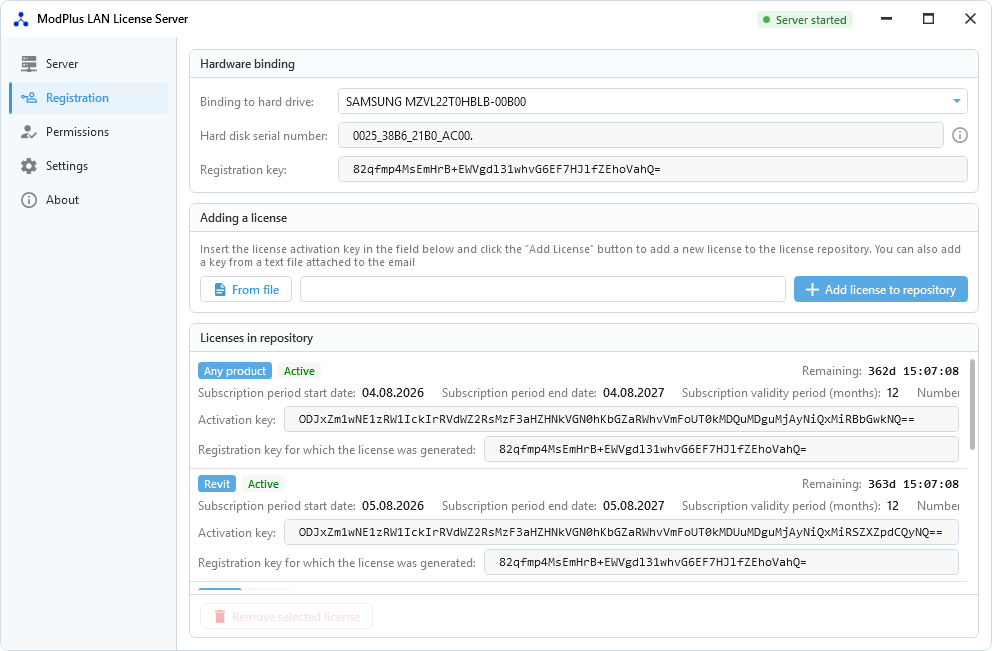
RegistrationTab

Binding to hard drive – dropdown list with all hard drives found on this computer.

Hard disk serial number – information field showing the serial number of the selected hard disk

Registration key – the registration key of the current version of the license server. The registration key is generated based on the serial number of the hard drive selected in the list above.

When changing the hard disk, the registration key will be changed, which will entail a change in the status of the existing licenses, as well as a one-time shutdown of all users, in case the server is started to listen

Add license – adds a license to the license repository based on the activation key entered in the field on the left. When adding a license, the number of available jobs is recalculated, so there is no need to stop the server.

Next is a field that lists all the licenses in the license repository. For each license, its basic data is displayed:

  • Product for which jobs are issued. May be of the type “Any product” if the license is purchased for the whole ModPlus plugin
  • The start date of the subscription period, the end date of the subscription period, the subscription validity in months (3, 6 or 12) and the remaining subscription time
  • Number of users - the number of jobs issued by this license
  • Activation key on the basis of which this license is added
  • Registration key for which the license was generated

Remove selected license – permanently deletes the selected license from the license repository.

Removing a license leads to a one-time disconnection of all users, in case the server is running to listen.


Permissions
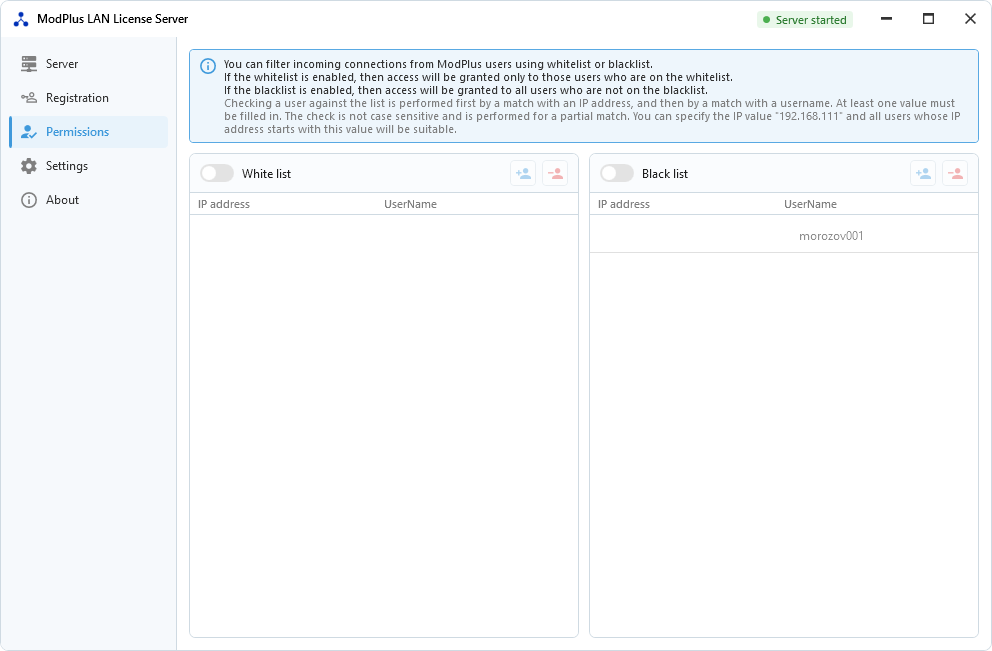
PermissionsTab

This tab allows you to create and use a whitelist or blacklist to filter incoming connections.


Settings
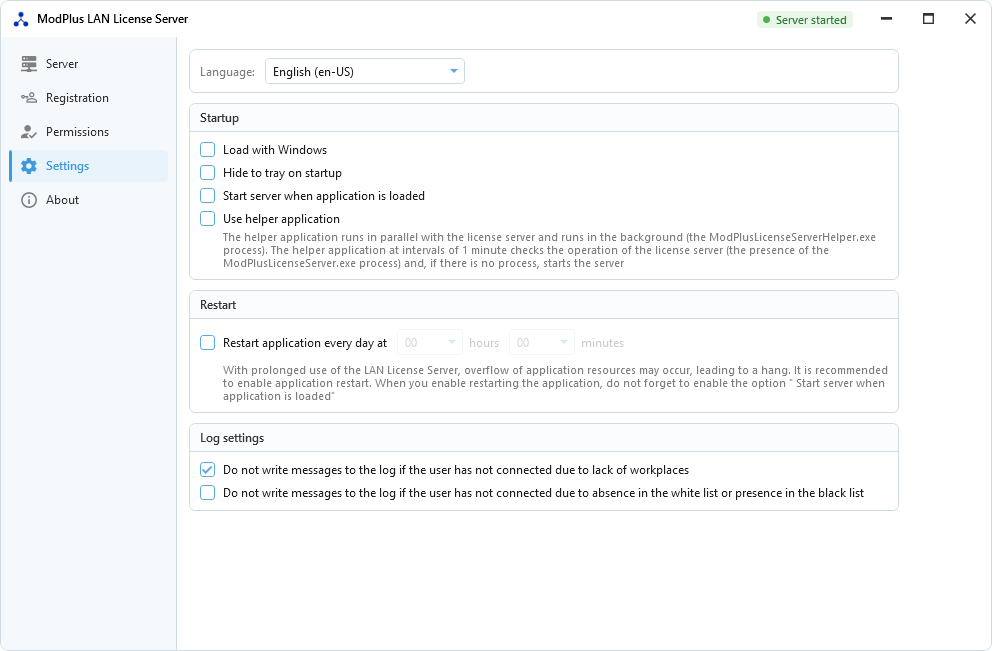
SettingsTab

Language — select the current language. Changing the language does not require rebooting the server. When you first start the language is set according to the settings of the operating system. If there is no suitable language, the default language is Russian.

Load with Windows – add or remove license server from Windows startup.

Hide to tray on startup – if checked, the license server will automatically minimize to tray on startup

Start server when application is loaded – if the checkbox is checked, then when the license server starts up, it will immediately start listening to the network on the set port.

Use helper application – when you check the checkbox of the location of the license server, the auxiliary application ModPlusLicenseServerHelper.exe will be extracted and launched. This application runs in the background and at intervals of 1 minute checks for the availability of the license server workflow (ModPlusLicenseServer.exe process). In case the process is not found, the application will start the license server.

The use of an auxiliary application is recommended in the case of enabling the Load with Windows and Start server when application is loaded options.

Restarting the application every day – with prolonged use of the LAN License Server, overflow of application resources may occur, leading to a hang. It is recommended to enable application restart. When you enable restarting the application, do not forget to enable the option Start server when application is loaded.

The application is launched using Windows Task Scheduler. Two tasks are created in the task scheduler: ModPlusLANLicenseServerStopTask - launches the KillServerProcess.bat executable file, which stops the process of the LAN of the License Server and the auxiliary application at a specified time. The KillServerProcess.bat file is created when the LAN License Server is started. ModPlusLANLicenseServerStartTask - starts the LAN License Server 10 seconds after the specified time.

Restarting the server (stop and start) every ... minutes – when checked, a timer with the specified time interval will be started, after which the server will be stopped (all users will be disconnected) and restarted.


About
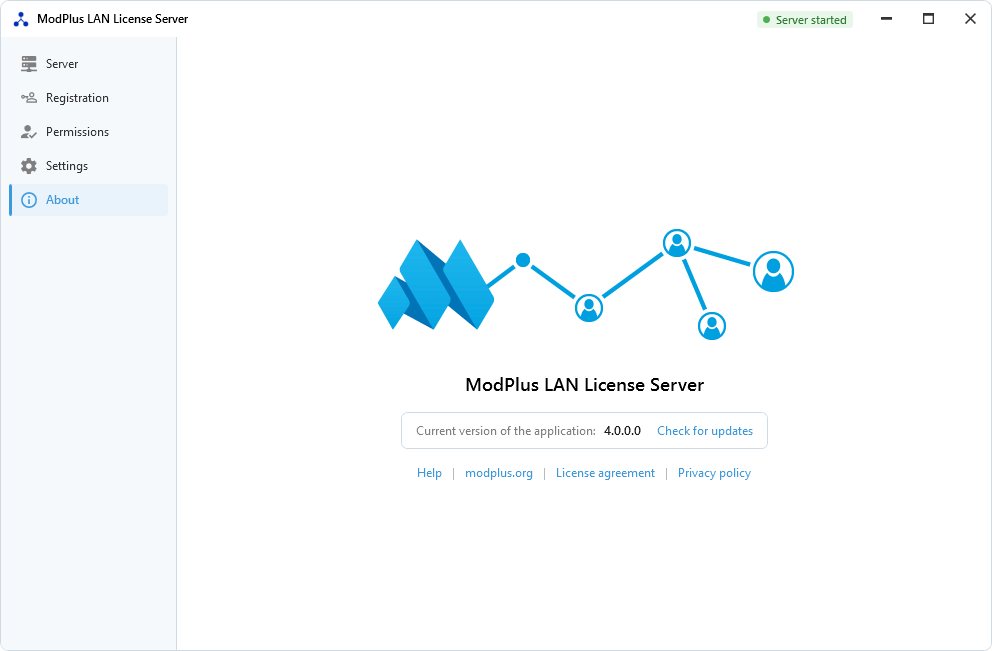
AboutTab

On this tab, you can go to the modplus.org website, find out the current version of the license server and check for updates.

Work in tray

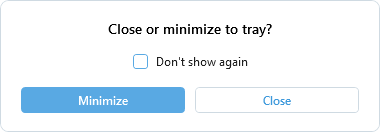
When you click close the program (cross) window appears:
CloseOrHide

You can close the program or minimize it to tray. When minimized, one of two possible icons will appear in the taskbar, depending on the listening state:

OnIcon  – if license server is running to listen on the local network
OffIcon  – if license server is not running to listen on the local network

Change history

Version 4.0.0.0 [06.08.2026]
- Optimized the performance of the main algorithms
- Redesigned the interface
- Added nanoCAD support
- Added German, Spanish and Simplified Chinese translations
- Removed the timer-based server restart

Version 3.2.0.0 [ 01.07.2026 ]
- Fixed an error that could occur when determining the license server path if the path name contains the # character

Version 3.1.0.0 [ 13.03.2026 ]
- Added local logging of handled errors (if an error occurs that is caught, the error will be written to the errors.txt file created next to the ModPlusLicenseServer.exe file)

Version 3.0.0.0 [ 21.12.2023 ]
- The main server algorithms have been rewritten: timers are used instead of tasks, the use of global data buffer has been removed, some errors have been fixed
- Increased the data reception period from 100 to 200 milliseconds
- Full display of date and time in the log
- Added color designations to the log

Version 2.5.3.0 [ 18.12.2023 ]
- Added a period of 5 minutes to the list of periods to restart the server by timer

Version 2.5.2.0 [ 18.12.2023 ]
- Fixed "This type of CollectionView does not support changes..." error occurring when using timed restarting

Version 2.5.0.0 [ 15.12.2023 ]
- Added ability to restart server operation (stop-start) by timer

Version 2.4.1.0 [ 07.12.2023 ]
- The time interval used to verify user connectivity has been increased from 10 seconds to 30 seconds

Version 2.4.0.0 [ 08.08.2023 ]
- Fixed bug that caused increased CPU load when licenses with expired validity period were present in the storage

Version 2.3.0.0 [ 01.08.2023 ]
- Fixed a bug where the hard disk serial number was not detected in case of hard disk replacement

Version 2.2.0.0 [ 30.03.2023 ]
- Removed Yandex.Metrica service used to collect license server launch statistics

Version 1.7.1.0 [ 22.12.2020 ]
- Updated address for checking for updates

Version 1.7.0.0 [ 22.11.2020 ]
- The principle of issuing licenses of the "Any product" type has been changed - if a user has several supported products running simultaneously (for example, AutoCAD and Revit), the user is occupied with one workplace of the "Any product" type
- Added the ability not to write messages to the log if the user has not connected due to lack of workplaces
- Added the ability not to write messages to the log if the user did not connect due to absence in the white list or presence in the black list
- On the "Server" tab in the "Connected users" list, a context menu has been added with the ability to copy a username to the clipboard, as well as add a user to the white or black list

Version 1.4.7.5 [ 17.10.2020 ]
- Added the ability to enable restarting the application every day at a specified time

Version 1.3.7.5 [ 20.09.2020 ]
- Added the "Permissions" tab, where you can configure a white or black list for filtering incoming connections
- Added display of the serial number of the selected hard disk on the "Registration" tab
- For all licenses in the repository, added display of the registration key for which the license was generated
- Changed application icon
- Added a link to help on the "About" tab

Version 1.2.5.2 [ 27.02.2020 ]
- Made minor changes to the methods of reading hard drives
- Added the ability to insert an activation key from a text file

Version 1.2.4.1 [ 15.10.2019 ]
- The display of errors in the pop-up window that occurs when checking for updates has been removed

Version 1.2.4.0 [ 22.09.2019 ]
- Added ability to minimize license server to tray
- Change the way of checking for updates
- Fixed some bugs

Version 1.0.3.0 [ 11.02.2019 ]
- Added admin rights to run application

Version 1.0.2.0 [ 07.02.2019 ]
- Added digital signature

Version 1.0.1.0 [ 17.01.2019 ]
- Fixed a bug that caused the server to close when the client was disconnected

Version 1.0.0.0 [ 15.01.2019 ]
- Release
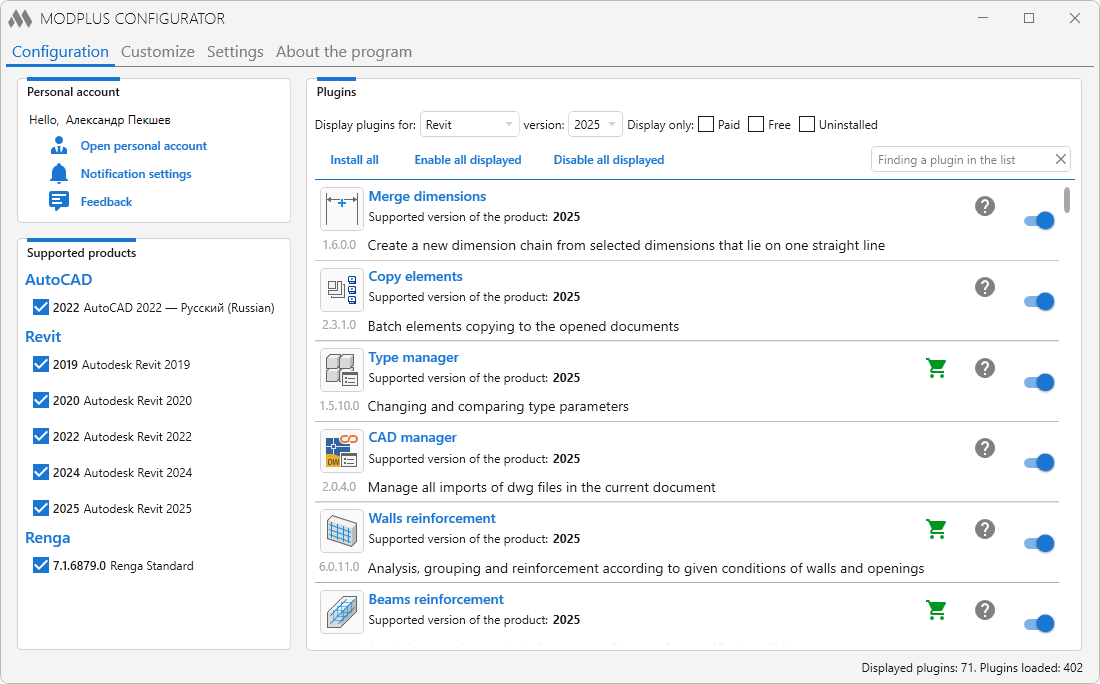
On January 20, 2026, the Configurator was officially removed from the ModPlus component package. This page has been kept on the website due to the large number of links to it in many news articles. More details about the reasons for its removal can be found in the article.

One of the ModPlus components that allows to manage connection to supported programs, manage plugins (install, disable or enable), change adaptation settings and basic ModPlus settings.

The executable file for the Configurator is mpConfig.exe, which is located in the ModPlus folder. The Configurator can also be launched via the context menu of the auto-update module or via a shortcut on the desktop (if a shortcut was created during installation).

The configurator consists of 4 main parts, placed in separate tabs:

Configuration

1

Personal account

Personal Account – opens a Personal Account with information about your account. Personal account contains general information about the account, information about licenses and the functionality for managing backups of settings.

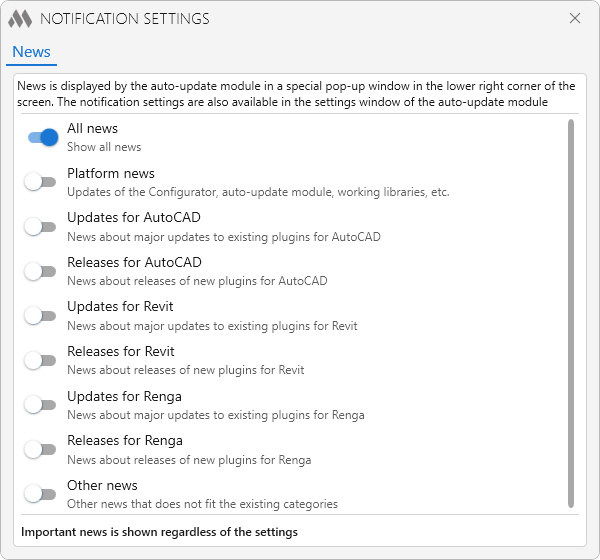
Notification settings – opens the notification settings window:

5

For details on notifications settings, see the auto-update module page.

Supported Products

The field contains a list of supported products (AutoCAD, Revit, Renga) and vertical solutions (AutoCAD) installed on this computer. Simply check the version to which you want to connect the ModPlus.

Plugins

The main window for managing your plugins.

At the top of the list of plugins are the controls for displaying the list:

Display plugins for: – select the Autodesk product for which you want to display the plugins. This list is populated depending on the availability of supported products on the user's computer.
versions: – select the version of the specified product. This list is populated depending on the availability of supported products on the user's computer.
Display only:
Paid – enable/disable displaying of paid plugins.
Free – enable/disable displaying of free plugins
Uninstalled – enable/disable the display of new plugins (i.e., not installed plugins).
To display all plugins, remove all checkmarks.
Install all – starts installing all missing plugins.
Enable all visible – enable all currently visible plugins.
Disable all visible – disable all currently visible plugins.

The following options are available to the right of the plugin name in the list:

1.1 – the presence of this button means that the plugin is paid. Clicking will go to the store site.
1.2 – the presence of this button means that the plugin is not available and is available for download. Pressing will download and unpack this plugin.
1.8 – the presence of this button means that the plugin has a video example. When clicked, the window opens with the video displayed.
Also available are: basic information (current version, available version, plugin description) and plugin enable/disable button.

Adaptation

2

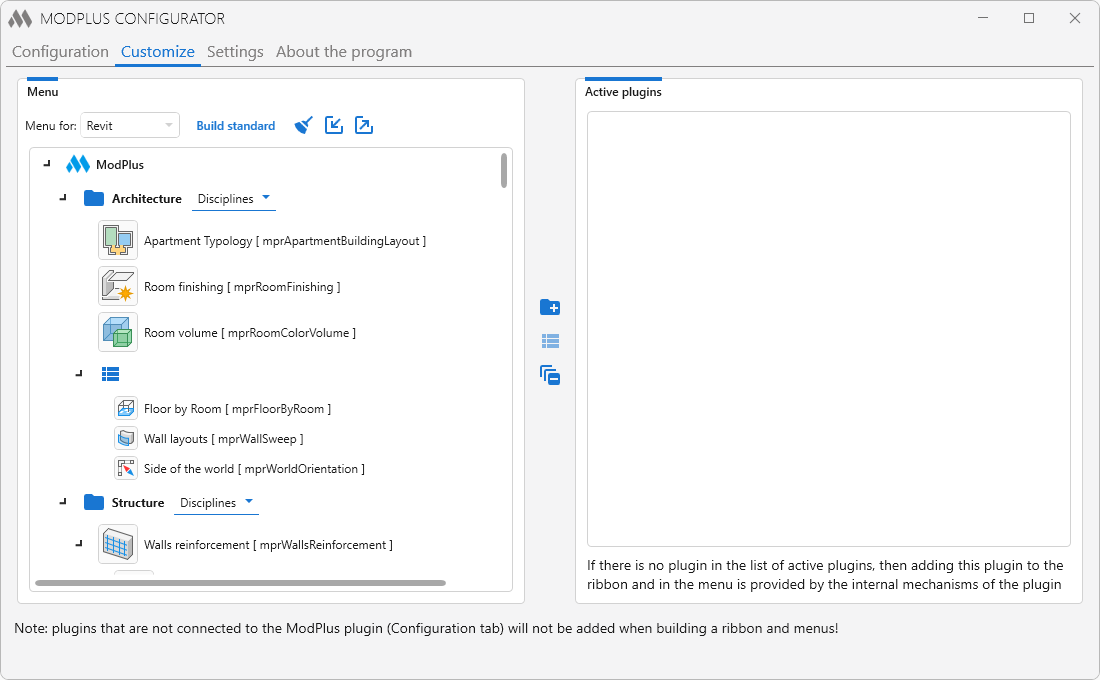
On this tab you can customize the appearance of the Ribbon (AutoCAD, Revit) and the Floating menu (AutoCAD). The tab contains two fields:

Menu for: [Autodesk product]

A tree view of your menu that contains groups and plugins in groups. Plugins can be either nested within a group or nested in another plugin (shown as a drop-down button on the ribbon). For Revit - Plugins can be added in a special panel (2 or 3 plugins). Inserting a group into the panel allows you to make buttons on a ribbon of a small size.

To the right of the list are the buttons for creating a new group folder plus variant or panel view list and a button that allows you to collapse all groups collapse all. Location of plugins is done by dragging them with the mouse.

Build standard - when the button is pressed, the menu will be built according to the standard scheme (connection to the internet is required).

1.1 – deletes the current menu for the specified supported product.
1.2 – import menu from xml file.
1.8 – export menu to xml file.

Active plugins

Contains a list of plugins that can be added to the menu (ie plugins available). You can display a list of all plugins or plugins that have not yet been added to the menu.


Settings

3

General

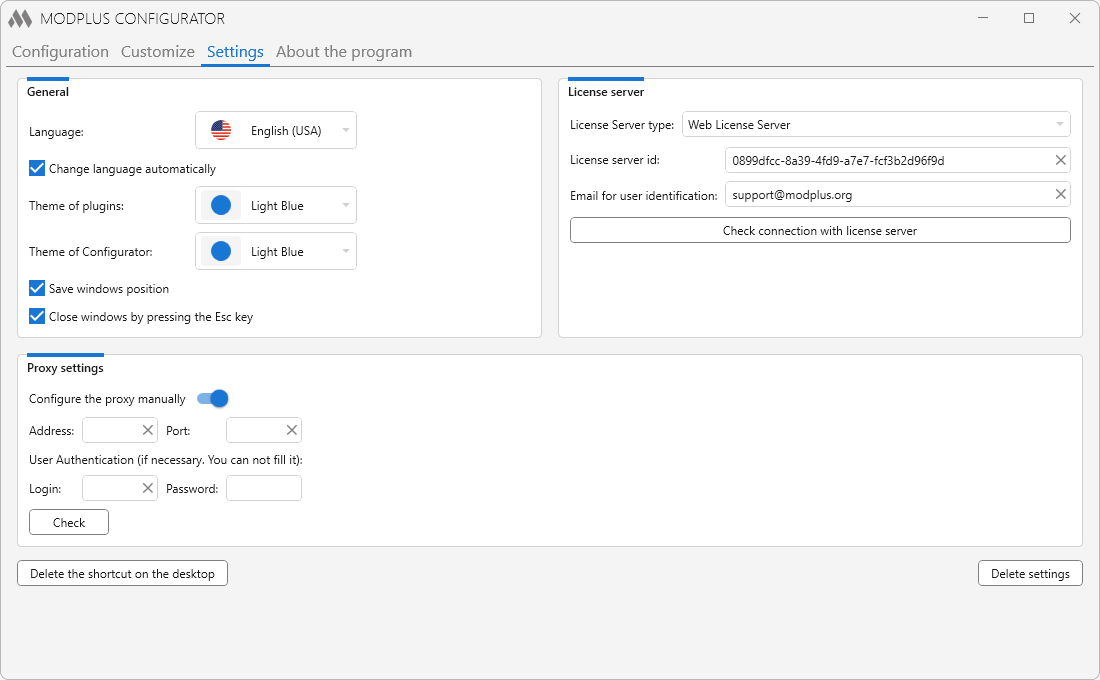
General settings of the ModPlus:

Language – setting the language for the entire software.

Change language automatically – localization of all ModPlus software will change automatically depending on the localisation of the supported product being launched (AutoCAD or Revit).

Theme of the plugins – the theme of the plugins design.

Theme of the Configurator – design theme of the configurator.

Save windows position – at the next starting the windows of the configurator and plugins will be located as at the moment of closing.

Close windows by pressing the Esc key – if this option is enabled, the windows of the configurator and plugins will be closed by pressing the Esc key.

LICENSE SERVER

License Server type – drop-down list for selecting the license server type. There are 3 options available: License server is not used, LAN License Server, Web License Server.

LAN LICENSE SERVER

License server IP address – ip-address of the computer in the local network (LAN) where the license server is installed and working. IP address can be obtained directly in the license server window

License server port – port number that will be used for two-way communication with the license server. The port number must be identical to the port number specified in the license server window

WEB LICENSE SERVER

License server id – unique ID of the license server. You can get the ID on the web license server administration page.

Email for user identification – email address used by the license web server to check the user's access and permissions. The Email address must be specified on the license web server administration page.

Proxy settings

When the Configure the proxy manually option is enabled, the fields for proxy server settings – proxy server address and port – become available. In addition, if necessary, you can specify a login and password for user authentication.

Other

Create a shortcut on the desktop – create a shortcut on the desktop to open the Configurator

Delete settings – delete all settings of the software: configuration file, entries in the registry, shortcut on the desktop. After removing the settings, the Configurator automatically closes


About the program

4

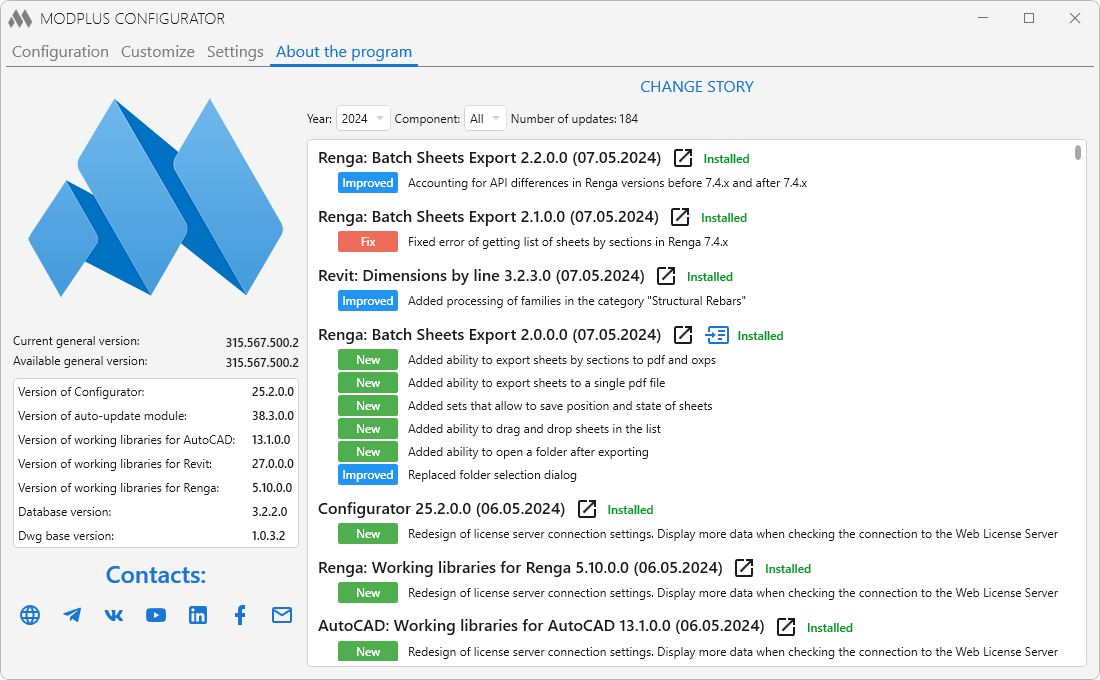
On this tab you will see the program logo, current and available general version of product, components versions, social links and change history.

To display the change history, there must be access to the internet and the modplus.org site. Change history is similar to the history of changes on the site.

PRIVACY POLICY

(hereinafter referred to as the “Policy”)

Last updated: April 3, 2025

This Policy outlines our rules and procedures regarding the collection, use, and disclosure of your information when you use the Service, and informs you about your privacy rights and how the law protects you. We use your personal data to provide and improve the Service. By using the Service, you agree to the collection and use of information in accordance with this Policy.

1. INTERPRETATION AND DEFINITIONS

Interpretation

Words with the first letter capitalized have meanings defined under the following conditions. The definitions shall have the same meaning regardless of whether they appear in singular or plural.

Definitions
For the purposes of this Policy:

  • Account means a unique account created for you to access our Service or parts of our Service.
  • Affiliate means an entity that controls, is controlled by, or is under common control with a party, where “control” means ownership of 50% or more of the shares, equity interest, or other securities entitled to vote for election of directors or other managing authority.
  • Company (referred to as either “the Company”, “We”, “Us” or “Our” in this Policy) refers to Individual Entrepreneur Aleksandr Aleksandrovich Pekshev, Russian Federation.
  • Cookies are small files that are placed on your computer, mobile device, or any other device by a website, containing details of your browsing history on that website.
  • Device means any device that can access the Service such as a computer, cellphone, or digital tablet.
  • Personal Data is any information that relates to an identified or identifiable individual.
  • Service refers to the Website.
  • Service Provider means any natural or legal person who processes the data on behalf of the Company. It refers to third-party companies or individuals employed by the Company to facilitate the Service, to provide the Service on behalf of the Company, to perform services related to the Service, or to assist the Company in analyzing how the Service is used.
  • Third-Party Social Media Service refers to any website or social network website through which a user can log in or create an account to use the Service.
  • Usage Data refers to data collected automatically, either generated by the use of the Service or from the Service infrastructure itself (for example, the duration of a page visit).
  • Website refers to ModPlus, accessible at https://modplus.org/ru/
  • You means the individual accessing or using the Service, or the company, or other legal entity on behalf of which such individual is accessing or using the Service, as applicable.

2. COLLECTION AND USE OF YOUR PERSONAL DATA

Types of data collected

Personal data

When using Our Service, We may ask You to provide Us with certain personal information that can be used to contact or identify You. Personal information may include, but is not limited to:

  • last name, first name, patronymic;
  • gender;
  • date of birth;
  • city;
  • country;
  • name of the firm/company (place of work);
  • position;
  • email address;
  • login;
  • phone number;
  • bank account details;
  • order history (license purchases);
  • usage data;
  • cookies.

Usage Data

Usage Data is collected automatically when you use the Service.

Usage Data may include information such as your device's Internet Protocol address (e.g. IP address), browser type, browser version, the pages of our Service that you visit, the time and date of your visit, the time spent on those pages, unique device identifiers and other diagnostic data.

When you access the Service by or through a mobile device, We may automatically collect certain information, including, but not limited to, the type of mobile device you use, your mobile device unique identifier, the IP address of your mobile device, your mobile operating system, the type of mobile Internet browser you use, unique device identifiers and other diagnostic data.

We may also collect information that your browser sends whenever you visit our Service or when you access the Service by or through a mobile device.

Social Media Information

The Company allows you to create an account and sign in to use the Service through the following Third Party Social Media Services:

  • Google
  • Facebook
  • Yandex
  • VK
  • GitHub

If you choose to register through Third Party Social Media Services or otherwise provide Us with access to them, We may collect Personal Data that is already associated with your Third Party Social Media Service account, such as:

  • last name, first name, middle name;
  • email address;
  • login;
  • phone number;
  • profile photo;
  • language preferences;
  • general account information (including your activities or your contact list associated with this account);

You may also have the opportunity to share additional information with the Company through your Third Party Social Media Service account. If you choose to provide such information and Personal Data during registration or otherwise, you grant the Company permission to use, share and store it in accordance with this Policy.

Tracking Technologies and Cookies

We use cookies and similar tracking technologies to track activity on Our Service and store certain information.

The tracking technologies we use are beacons, tags, and scripts to collect and track information and to improve and analyze Our Service. The technologies we use may include:

  • Cookies or browser cookies. A cookie is a small file placed on your device. You can set your browser to reject all cookies or to indicate when a cookie is being sent. However, if you do not accept cookies, you may not be able to use some parts of Our Service. Unless you have set your browser to reject cookies, Our Service may use cookies.
  • Web beacons. Some sections of our Service and our emails may contain small electronic files known as web beacons (also called clear gifs, pixel tags, and single-pixel gifs) that allow the Company to, for example, count the number of users who have visited those pages or opened an email, and obtain other statistics (for example, to record the popularity of a particular section and to verify the integrity of the system and server).

Cookies may be either “persistent” cookies or “session” cookies. Persistent cookies remain on your personal computer or mobile device when you log offline, while session cookies are deleted as soon as you close your web browser. You can learn more about cookies from the article on the TermsFeed website at https://www.termsfeed.com/blog/cookies/#What_Are_Cookies.

We use both session and persistent cookies for the purposes set out below:

  • Necessary cookies
Type: Session cookies
Administered by: Russia
Purpose: These cookies are necessary to provide you with the services available on the Website and to enable you to use some of its features. They help to identify users and prevent fraudulent use of user accounts. Without these cookies, the services you have requested cannot be provided, and we only use these cookies to provide you with such services.
  • Cookie Policy / Cookie Acceptance Notice
Type: Persistent cookies
Administered by: Russia
Purpose: These cookies determine whether users have accepted the use of cookies on the website.
  • Functionality cookies
Type: Persistent cookies
Administered by: Russia
Purpose: These cookies allow us to remember your preferences when using the Website, such as remembering your login details or language preferences. The purpose of these cookies is to make the Website more convenient for you and to avoid you having to re-enter your preferences each time you use the Website.
  • Analytics cookies
Type: Persistent cookies
Administered by: Russia
Purpose: These cookies allow us to count visits and traffic sources in order to evaluate and improve the performance of our Website. Thanks to them, we know which pages are the most and least popular, and see how the User moves around the Website. All data collected by these cookies is aggregated into statistics and is anonymous.

Yandex Metrica is a web analysis service provided by Yandex LLC (OGRN: 1027700229193; INN: 7736207543; legal address: 119021, Moscow, Leo Tolstoy St., 16), which uses the collected data to track and study the use of the Site, prepare reports on its activities and exchange them with other Yandex services. For more details, go to the "Privacy Policy" at https://yandex.ru/legal/confidential/.

You can learn more about how to manage cookies in popular web browsers at the following links:

Microsoft Edge, Internet Explorer https://support.microsoft.com/en-us/microsoft-edge/delete-cookies-in-microsoft-edge-63947406-40ac-c3b8-57b9-2a946a29ae09
Google Chrome https://support.google.com/chrome/answer/95647?hl=en-GB
Firefox https://support.mozilla.org/en-US/kb/delete-browsing-search-download-history-firefox
Safari для Mac, IOS, iPad OS (iPhone / iPad) https://support.apple.com/ru-ru/guide/safari/sfri11471/mac
Opera https://blogs.opera.com/news/2015/08/how-to-manage-cookies-in-opera/

For more information on how to manage and delete cookies, visit http://aboutcookies.org. For more information about cookies and how to manage them, visit http://youronlinechoices.eu (if you are in the EU) or http://aboutads.info (if you are in the US).

Use of Your Personal Data

The Company may use Personal Data for the following purposes:

  • To provide and support Our Service, including monitoring the use of Our Service.
  • To manage Your account: to manage your registration as a user of the Service. The Personal Data you provide may give you access to various features of the Service available to you as a registered user.
  • To perform a contract: to enter into, comply with and perform the terms of a license agreement, or any other contract with Us, through the Service.
  • To contact you via email, telephone, SMS or other equivalent forms of electronic communication, such as mobile app push notifications about updates or informational messages related to contracted features, products or services, including security updates, when necessary or advisable to implement them.
  • To provide you with news, special offers and general information about other services, goods, services or events that We offer that are similar to those that You have already purchased or enquired about, unless You have opted out of receiving such information.
  • To process Your requests: to process and fulfil Your requests to Us.
  • In connection with a business transfer: We may use Your information to evaluate or carry out a merger, sale, restructuring, reorganization, liquidation or other sale or transfer of some or all of Our assets, whether as a going concern or as part of a bankruptcy, liquidation or similar proceeding in which personal information We have about users of Our Service is transferred along with other assets.
  • For Other Purposes: We may use your information for other purposes, such as data analysis, identifying usage trends, determining the effectiveness of our advertising campaigns, and to evaluate and improve our Service, products, services, marketing, and your experience.

We may share your personal information in the following situations:

  • With Service Providers: We may share your personal information with service providers to monitor and analyze the use of our Service and to communicate with you.
  • During Business Transfers: We may share your personal information in connection with, or during negotiations of, any merger, sale of Company assets, financing, or acquisition of all or a portion of Our business to another company.
  • With Affiliates: We may share your information with our affiliates, in which case we will require them to comply with this Policy. Affiliates include our parent company and any other subsidiaries, joint venture partners or other companies that We control or that are under common control with Us.
  • With Business Partners: We may share your information with our business partners to offer you certain products, services or promotions.
  • With Your Consent: We may disclose your personal information for any other purpose with your consent.

Retention of Your Personal Information

The Company will retain your personal information only for as long as necessary for the purposes set out in this Policy. We will retain and use your personal information to the extent necessary to comply with our legal obligations (for example, if we are required to retain your information to comply with applicable laws), resolve disputes, and enforce our legal agreements and policies.

The Company will also retain usage data for internal analysis. Usage Data is generally retained for a shorter period of time, except when this data is used to enhance the security or functionality of Our Service, or when We are legally obligated to retain this data for a longer period of time.

Transfer of Your Personal Data

Your information, including personal data, is processed at the Company's operating offices and in any other locations where the parties involved in the processing are located. This means that this information may be transferred to and stored on computers located outside of your location or country where the data protection laws may differ from those of your jurisdiction.

Your consent to this Policy, as well as your provision of such information, constitutes your consent to the transfer of data.

The Company will take all steps reasonably necessary to ensure the security of your data and its processing in accordance with this Policy. Your personal data will not be transferred to any organization or country unless adequate controls are in place, including the security of your data and other personal information.

Deleting Your Personal Data

You have the right to delete or request deletion of Personal Data that We have collected about you.

Our Service may provide you with the ability to delete certain information about you from the Service.

You can update, change or delete your information at any time by logging into your account, if you have one, and going to your account settings where you can manage your personal information. You can also contact us to request access to, correct or delete your personal information.

However, please note that we may need to retain certain information if we have a legal obligation or a legal basis to do so.

3. DISCLOSURE OF YOUR PERSONAL DATA

Business Operations

If the Company is involved in a merger, acquisition or asset sale, your personal information may be transferred. We will provide notice before your personal information is transferred and becomes subject to a different Privacy Policy.

Law Enforcement

In certain circumstances, the Company may be required to disclose your personal information if required to do so by law or in response to valid requests from public authorities (such as a court or government agency).

Other Legal Requirements

The Company may disclose your personal information in the good faith belief that such action is necessary to:

  • Comply with a legal obligation;
  • Protect and defend the rights or property of the Company;
  • Prevent or investigate possible wrongdoing in connection with the Service;
  • Protect the personal safety of Users of the Service or the public;
  • Protect against legal liability.

4. SECURITY OF YOUR PERSONAL DATA

The security of your personal information is important to Us, but remember that no method of transmission over the Internet, or method of electronic storage is 100% secure. While We strive to use commercially acceptable means to protect your personal information, We cannot guarantee its absolute security.

5. PRIVACY OF CHILDREN

Our Service is not directed to individuals under the age of 18. We do not knowingly collect personal information from individuals under the age of 18. If you are a parent or guardian and you are aware that your child has provided Us with personal information, please contact Us. If we learn that we have collected personal information from anyone under 18 without verification of parental consent, we will take steps to remove that information from our servers.

If we need to rely on consent as a legal basis to process your information and your country requires parental consent, we may request your parent's consent before collecting and using that information.

Our Service may contain links to other websites that are not operated by us. If you click on a link from a third-party site, you will be directed to that third-party site. We strongly advise you to review the Privacy Policy of every site you visit.

We have no control over, and assume no responsibility for, the content, privacy policies, or practices of any third-party sites or services.

7. CHANGES TO THIS POLICY

We may update our Policy from time to time. We will notify you of any changes by posting the new Policy on this page.

We will let you know via email and/or a prominent notice on our Service, prior to the change becoming effective and update the “Last updated” date at the top of this Policy.

We encourage you to review this Policy periodically for any changes. Changes to this Policy will come into effect after they are posted on this page.

8. CONTACT US

If you have any questions about this Policy, you can contact us by email: This email address is being protected from spambots. You need JavaScript enabled to view it.

ACCESSION AGREEMENT ON THE USE OF the ModPlus SOFTWARE

This License Agreement on the use of the ModPlus software product (hereinafter – the Agreement) represents a legal agreement between the Owner and an individual or legal entity (hereinafter – the User). By installing, copying, or downloading ModPlus software, accessing it or using it in any other way, the User fully agrees with all terms and conditions of this Agreement, agrees to enter into it and to abide by the terms of this Agreement.

By entering into this Agreement, the User agrees to the collection and transfer to the Owner of anonymized service information on the nature and methods of use of the ModPlus software. The user acknowledges and agrees that the Owner may receive, store, process, publish and make available to third parties the anonymized data received from the User in the generalized form for the permitted functional use and further technical improvement of the Software, as well as in fulfilling the marketing tasks.

The User gives the Owner his/her consent to use personal data provided to the Owner during registration in accordance with the privacy policy, followed by the Owner with respect to the processing of personal data.

TYPES OF LICENSES PROVIDED

The single-user license for certain paid plugins included in the ModPlus Software. The license shall cover the entire life of the supported product (AutoCAD, Revit, etc.) of the version for which the license has been purchased.

The single-user license for all paid plugins of the ModPlus Software. A single-user license option is available, covering only the specific supported product (AutoCAD, Revit, etc.). The license validity period is 3, 6, and 12 months.

The corporate (multi-user) license for all paid plugins of the ModPlus Software. A corporate (multi-user) license option is available, covering only the specific supported product (AutoCAD, Revit, etc.). The number of jobs using the license is determined by the User when purchasing a license. The license validity period is 3, 6, and 12 months. Using a corporate (multi-user) license is provided in one of two ways: 1. Installing a LAN License Server (downloaded separately). 2. Using the Web License Server (installation of additional software is not required).

AS IS

The user accepts the ModPlus Software as is, in its current state, without any implied warranty or features. The Owner does not warrant that the ModPlus Software does not contain errors and does not assume any responsibility for direct or indirect damages, including lost profits, loss of confidential information resulting from the application of the ModPlus Software, including due to possible errors or misprints in the software set.

GRANTING OF LICENSE

The user is granted a non-exclusive right to use the ModPlus Software in accordance with the conditions specified in this Agreement

COPYRIGHT AND OWNERSHIP RIGHT

ModPlus software, including its code, documentation, distribution kit, the structure is the exceptional product of the Owner, who reserves the ownership rights to the ModPlus Software, as well as copies and modifications thereof. The Owner also reserves the copyright to the ModPlus Software.

LIMITATIONS

The user undertakes not to carry out independently and not to allow third parties to perform the following actions:
- To disassemble, decompile (convert object code into original text) the programs, databases and other ModPlus software components, except for cases where the possibility of such action is expressly permitted by applicable legislation of the Russian Federation.
- To modify the ModPlus software, as well as to amend the object code of the programs and databases thereto, except for those changes that are made by means included into the software package and described in the documentation.
- Otherwise reverse engineer the ModPlus software, or to translate, adapt, compile the ModPlus software, create derivative works or otherwise make changes to the ModPlus software for any purpose.
- To use any equipment, device, software, or other means to (or designed to) bypass or remove technical protection in any form that is used by the ModPlus software.
- The ModPlus software is licensed as a single unit. It cannot be split into components for use on multiple computers, except for the acquisition of Corporate (multi-user) license.
- To create the conditions for the use of the ModPlus software by the non-licensed persons, including those working in the same network or multi-user system with the User.
- To distribute the ModPlus software. The distribution shall mean, in particular, the provision of third-party access to software components reproduced in any form, including by selling, renting, letting or lending.

TECHNICAL SUPPORT

The Owner shall provide technical support services for the ModPlus Software ("technical support services"). For technical support, use contact details listed on the "Contacts and Details" page: https://modplus.org/contacts, as well as on the official forum: https://modplus.org/ru/forum. Any additional programs and the source texts transferred to you as a result of the technical support provision should be considered as an integral part of the ModPlus Software and are therefore subject to the limitations and conditions hereof. Technical data provided to the technical support service in the request can be used by the Owner for internal purposes, including technical support of software products and software development. The Owner will not use this information in a form that discloses the User's personal data.

Limitation of Liability

UNDER NO CIRCUMSTANCES THE OWNER SHALL BE LIABLE FOR ANY DIRECT, INDIRECT, SECONDARY, INCIDENTAL, SPECIAL OR PUNITIVE LOSSES, INCLUDING, IN PARTICULAR, FOR DAMAGES ASSOCIATED WITH LOSS OF USE OR PRODUCTION, LOSS OF INCOME OR PROFIT, LOSS OF DATA OR THIRD-PARTY CLAIMS, EVEN IF THE OWNER HAS BEEN WARNED OF THE POSSIBILITY OF SUCH DAMAGES.

RIGHT OF REFUSAL

The Owner reserves the right, at its discretion, to terminate the provision of services and the sale of the proposed software products, as well as to change/close access to previously purchased software products on the modplus.org website, in cases involving the copyright infringement or assistance in the matter of copyright infringement, on the ModPlus Software presented on the modplus.org website.

If the User does not accept the terms of this Agreement in full, he/she shall not use the ModPlus Software for any purpose.

The Owner reserves the right to amend this Agreement at any time, having published the amendments on the modplus.org website 10 (ten) calendar days before the changes come into force.