


Side of the world

Several Revit applications are running. Choose one:
Icon


Related news and articles
Using
There are two possible ways to use the plugin: analyze orientation by side of the world for rooms and analyze orientation for elements regardless of the presence of a room.
BY ROOMS
For elements of the selected categories, the cardinal direction (considering true north orientation) is determined relative to the selected room, regardless of the element’s own orientation on the site. The analysis result can be written to the room parameter and/or to the selected elements parameter.
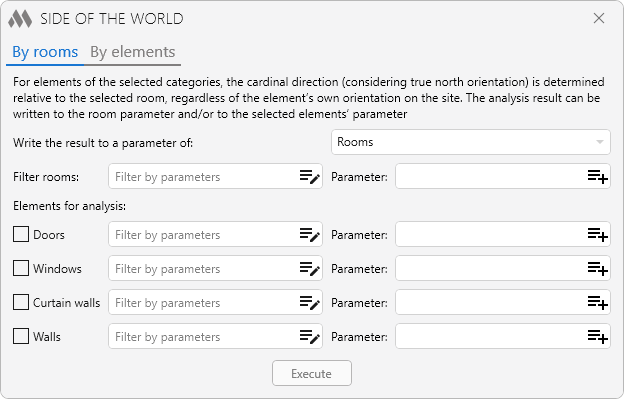
Write result to a parameter of: – select where the results of analysis are to be written. The selected option affects the availability of fields for indicating the parameter.
Filter rooms: – optional filter of rooms by parameters. If nothing is specified, all rooms will be processed according to the option selected.
Parameter: – field for specifying the name of the parameter to which the analysis result will be written. The parameter must be of string type. The field is available, if in the drop-down list Write result to a parameter of: you have selected the option Rooms or Rooms and elements.
Elements for analysis: – selection of element types, by which the analysis will be performed. To perform analysis you must choose at least one type.
For each type you can set the optional parameter filter and parameter name to record the result. The field Parameter: is available if in the dropdown list Write result to a parameter of: you have selected the option Elements or Rooms and elements.
Execute – switch to selection of rooms (selected, in current view or in the whole model) with further analysis of orientation through windows, doors or curtain walls, located in enclosing constructions of rooms.
Orientation is recorded as values "N", "S", "E", "W", "NW", "SW", "NE", "SE". If the orientation is written to a room parameter and several orientations will be found in the room, they will be written with a "+" sign. For example, if the room has a window facing north and a window facing east, the result will be written as "N+E".
BY ELEMENTS
or elements of the selected categories, the orientation of the front side is determined relative to true north. The analysis results can be written to the parameter of the selected elements.
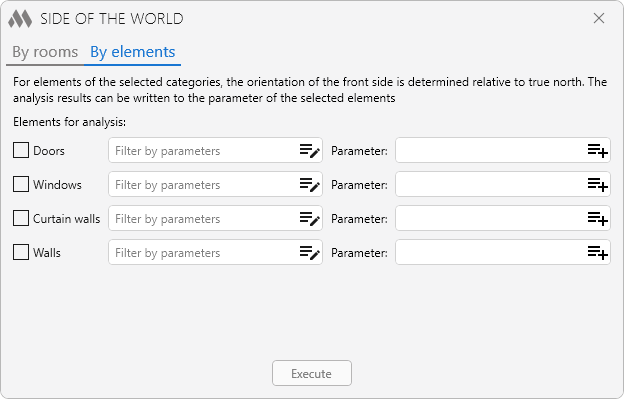
Elements for analysis: – selection of element types, by which the analysis will be performed. To perform analysis you must choose at least one type.
For each type, you can specify an optional filter of elements by parameter and the name of the parameter to write the result. The parameter must be of string type.
Execute – switch to selection of elements (selected, in current view or in the whole model) with further analysis of their orientation.
Orientation is recorded as values "N", "S", "E", "W", "NW", "SW", "NE", "SE".

 YouTube