


Show views on 3D
Several Revit applications are running. Choose one:
| Name | Discount | Total value of individual orders | Total value of corporate orders |
|---|---|---|---|
| Regular user | 0% | ||
| 3% discount | 3% | $84 | $180 |
| 5% discount | 5% | $120 | $360 |
| 7% discount | 7% | $180 | $600 |
| 10% discount | 10% | $300 | $900 |
| 15% discount | 15% | $360 | $1 200 |
| Partners | 30% | ||
| BIM Consulting | 50% | ||
| Super VIP | 100% |
Icon


Related news and articles
Using
The plugin allows you to create a range of visibility of views in color on a 3D using DirectShape in the "Generic Model" category. Elements of the DirectShape type refer to non-editable geometry.
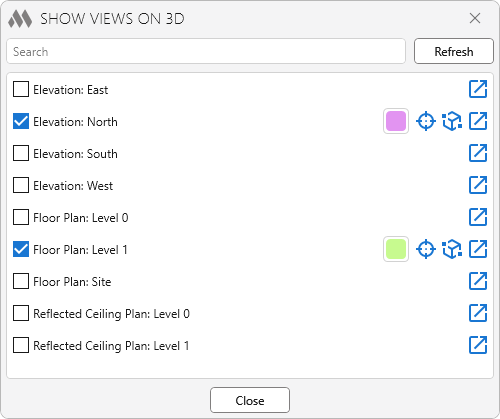
The plugin window is populated with a list of model views that fall within the boundaries of the current 3D view. To the right of the view name there is a  button, which allows you to quickly open this view.
In the upper part of the window there is a field for quick search by view name.
The Refresh is used to update the list of views in case of their changes when the plugin window is open on a 3D view, as well as to change the borders of the current 3D view. If changes were made on other views, the list will be updated automatically when switching views.
To display the range of visibility of a view, you should check the checkbox in front of the view name. In this case, in the right part of the window opposite to the view name you will see the color of the range of visibility, the  button, which allows you to select and show this range of visibility in the center of the screen, as well as the
 button that sets the 3D crop box by range of visibility.
When you close the plugin window, all ranges of visibility are removed.
If you close the document with saving while the plugin window is open, the elements of DirectShape will remain (saved) in the document!

 YouTube