


Sum of parameters

Several Revit applications are running. Choose one:
Icon


Related news and articles
Using
After starting the plugin, you should select the elements in the view for which you want to calculate the sum of numeric parameters and click Take. The plugin also processes preselected elements.
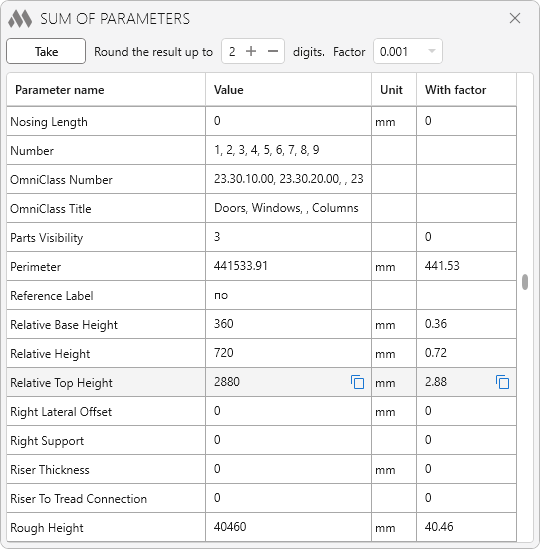
The main part of the plugin window is occupied by the parameter processing results table. The first column displays a list of parameter names that are available for all selected element categories. The second column displays the processing result: for numeric parameters, the sum of their values; for string parameters, a list of unique values separated by commas. The third column contains the units (for numeric parameters, if applicable). The fourth column displays the result of multiplying the sum of the numeric parameter values from the second column by the Factor, which can be selected from the list or entered manually in the field at the top of the window. For string parameters, the fourth column is left empty.
When you hover over a table row, a  button appears next to the processing result, allowing you to copy the value to the clipboard. For numeric parameters, the button is also displayed next to the value calculated using the coefficient.
Round the result up to ... digits option allows to specify the number of digits after the decimal point for rounding the value of the sum of parameters. Valid values are from 0 to 5.