


Utilities for working with rebar

Several Revit applications are running. Choose one:
Icon


Related news and articles
Using
Remove from host


Remove all reinforcement (rebars, area reinforcement, path reinforcement, rebar containers) from the selected host element.
Copy to host


Copying rebars taking into account Groups and Assemblies from the source host element into the target host elements. The command runs cyclically - requesting target elements will occur until the command is interrupted by pressing Esc. The displacement distance of the copied reinforcement is defined through the mass points of the solid of host elements. When processing structural columns, the rotation of the columns relative to the Z-axis is taken into account.
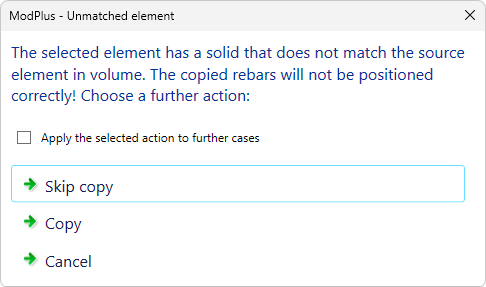
If the solid body of the source host element does not match the solid body of the target element, a message will be displayed with the options for further actions:
Explode Set


The command allows you to turn a rebar set (rebar with a given layout) into individual rebar bars.
The command handles all types of the layout except "Single". The command processes rebar sets of variable length.
Split set


The command allows you to split a rebar set (rebar with a given layout) into two new rebar sets. After selecting a rebar set, you will be asked to specify the bar in the set (by selecting any part of its geometry) by which to divide it.
The command handles all types of the layout except "Single". The command processes rebar sets of variable length.
CHANGE PRESENTATION


The command allows batch change of rebar representation. Dialog window:
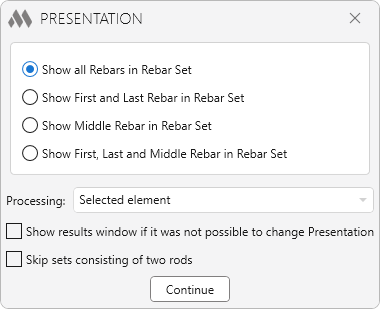
After starting the command, you must select one of the four ways of rebar representation and the way of selecting elements in the drop-down list (Selected element, Selected elements, All elements on view, All but selected elements on view).
You can optionally enable the display of the results window and skip two rod sets using the appropriate options at the bottom of the plugin window.
The command handles all types of layouts except "Single".

 YouTube