
Merge dimensions

Merge dimensions
Show in Revit

Several Revit applications are running. Choose one:

This is a free plugin!
Create a new dimension chain from selected dimensions that lie on one straight line

Icon

mprMergeDims_32x32 mprMergeDims_16x16 mprMergeDims_32x32_dark mprMergeDims_16x16_dark

Related news and articles


Using

The plugin loops until an interrupt is triggered by pressing the Esc key.

Choose two or more dimensions:
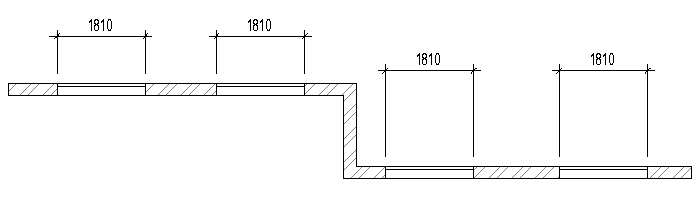
1

The plugin will group the selected dimensions according to the dimension line position (i.e. dimensions with dimension lines lying on one straight line will be included in one group), and then will create a new dimension chain in their place, filling in all the gaps. The original dimensions will be removed:
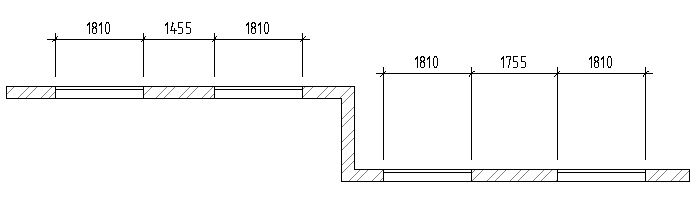
2

ModPlus YouTube
Improved
Correct processing of dimensions in a 3D view created on another work plane
Fix
Fixed an error occurring when selecting dimensions with an equality formula
New
Deletion of dimensional chains consisting entirely of zero-length segments
Improved
Avoiding zero dimensions when selecting dimensions
New
Added ability to use the plugin in the family editor
Fix
Changed icons
Fix
Added command access settings on the ribbon
Fix
Fixed an error that occurs when processing a dimension that points to the centerline of a linear element
Fix
Fixed "Invalid number of references" error that occurs when processing dimensions placed on "Level" element
New
Added copying of text fields of original dimensions
New
Added copying of the text position of the original dimensions
New
Added ignoring of dimension references to hidden elements
New
Added deletion of segments of zero length
Fix
Added processing of special cases of coincidence of the dimension line
Fix
Added handling of dimensions for grids that are not recreated by standard functions