


Dim offset

Several Revit applications are running. Choose one:
Icon


Related news and articles
- New function for Revit: Dim offset
- Revit. Dim offset 6.0. Determining the position relative to the element
Using
The application monitors all the created or edited dimensions and in case the dimensional text falls on dimensional lines, it moves the text aside!
When the plugin is started, the status control window opens.:
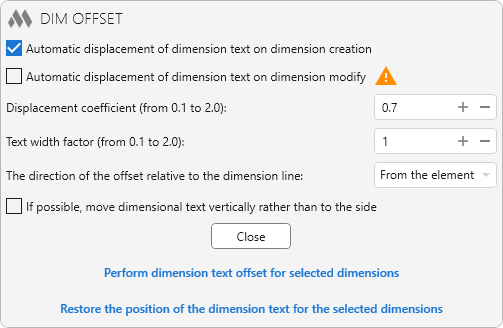
When checking the box Automatic displacement of dimension text on dimension creation tracking of all created dimensions is included, and if the dimension text falls on the dimension lines, the text will be moved to the side.
Automatic displacement of dimension text does not work in detached Revit windows.
If you are working in Revit 2019-2020, then before running the "Reload Latest" command on the "Collaborate" tab, you must disable the plugin, as the offset of the dimension text will be applied to the dimensions obtained from the loaded changes!
When checking the box Automatic displacement of dimension text on dimension modify tracking of all dimensions existing in the document is included, and if editing a dimension (for example, adding new dimension lines) dimension text falls on dimension lines, the text will be moved to the side.
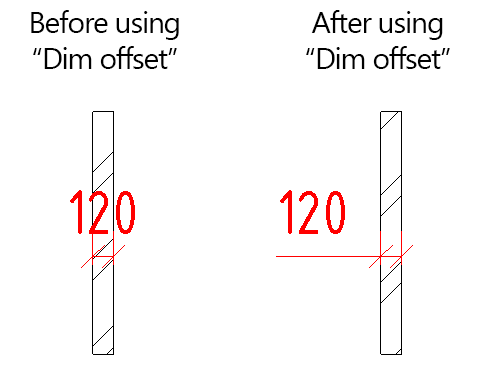
Due to revit API limitations, the plugin does not process dimensions where the "Equality Display" property is set to "Equality Formula".
The direction of the offset relative to the dimension line – direction of text offset downwards or upwards relative to the dimensional line. The offset vector is defined relative to the dimension line vector, which in most cases is directed from left to right. If the dimension line vector is directed from right to left, the text will be offset in the opposite order.
Text width factor – used when calculating the width of dimensional text and determining whether text should be shifted if the programmatically calculated width differs from the width of text drawn by Revit.
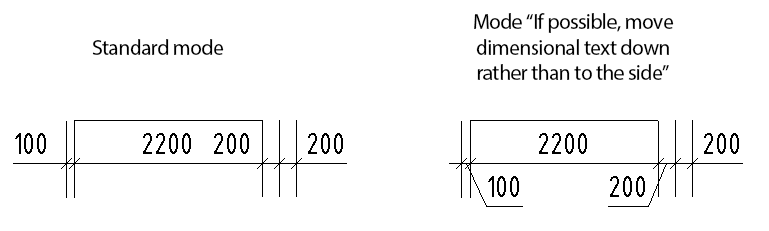
If possible, move dimensional text down rather than to the side – if an offset is required for the text of a dimension chain segment and the offset can be performed towards the adjacent segment, then the text will be moved not only to the side, but also down:
The state of the plugin is remembered in the settings and the next time you start Revit, the automatic tracking of the dimensions created is turned on/off.
If the "Text Offset" property is set to zero for a Dimension Type, the plugin may take a long time to work on large projects!
OFFSET SELECTED


Calling the command Perform dimension text offset for selected dimensions
RESTORE


Calling the command Restore the position of the dimension text for the selected dimensions

 YouTube