


Quick properties

Call options
- Renga main menu
Icon


Related news and articles
Using
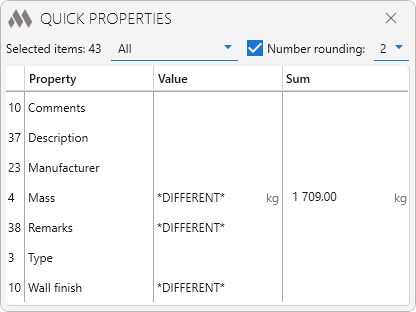
The plugin responds to the object selection change event.
The top part of the plugin window displays the number of selected objects. The properties filter by object category allows you to display properties for one category as well as for several categories by selecting them in the drop-down list. For numeric values there is the Number rounding option with the ability to set the number of decimal places.
The property table has four columns. The first column displays the number of objects with this property out of the total number of selected objects. In the third and fourth columns are the property values and their total values, respectively. Property values are changed on the fly with a delay of half a second, which improves the convenience of input when changing the property of a large number of objects.

 YouTube