


Filter

This is a free plugin!
Filtering selected elements by category
Call options
- Context menu in 3D view, Level view
Icon


Using
The filter is launched via the context menu in the 3D view when there are selected objects.
The window displays the categories and the count of selected objects. You can change the set of selected objects, leaving only those categories that are marked in the list
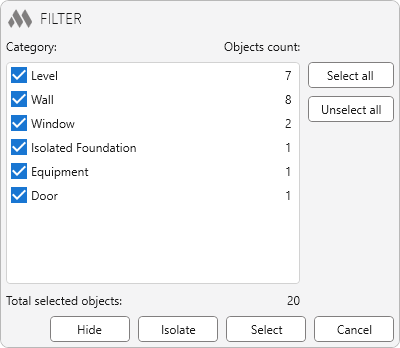
Select all – select all categories in the list
Select none – unselect all categories in the list
Hide – closing the plugin window and hiding of all objects of selected categories
Isolate – closing the plugin window and isolating all objects of selected categories
Select – closing the plugin window using changes in the set of selected objects
Cancel – closing the plugin window

 YouTube