


Levels

This is a free plugin!
Displaying a list of levels with the ability to control their visibility
Call options
- Renga main menu
Icon


Related news and articles
Using
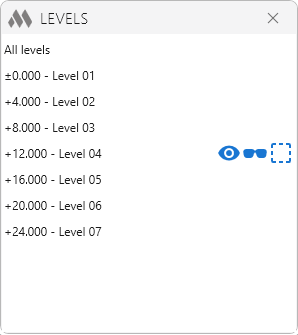
The main window of the plugin contains the item "All levels" and the levels of the current model. When you hover the mouse over a position in the list, the available commands are displayed:
 |
– invert Visibility: changes the visibility of all objects belonging to the level to the opposite. If objects were visible, they will become hidden; if they were hidden, they will become visible. When calling the command at the "All levels" position, the visibility of all levels will be inverted. |
 |
– isolate Level: Hides all objects in the view that do not belong to the level. When the command is called at the "All levels" position, the visibility of all objects will be turned on. |
 |
– select Level: Selects all objects belonging to the level. When calling the command at the "All levels" item, all objects belonging to all levels will be selected. |

 YouTube