


View orientation

Attention! The plugin is purchased for the specified version of Renga!
Discount system
| Name | Discount | Total value of individual orders | Total value of corporate orders |
|---|---|---|---|
| Regular user | 0% | ||
| 3% discount | 3% | $84 | $180 |
| 5% discount | 5% | $120 | $360 |
| 7% discount | 7% | $180 | $600 |
| 10% discount | 10% | $300 | $900 |
| 15% discount | 15% | $360 | $1 200 |
| Partners | 30% | ||
| BIM Consulting | 50% | ||
| Super VIP | 100% |
A subscription is your best choice. Find out why!
To use the purchased license, use the Personal Area of the ModPlus software installed on your computer
Controlling camera orientation in the 3D scene
Call options
- Context menu
Icon


Related news and articles
Using
The plugin is started from the context menu on the 3D view:
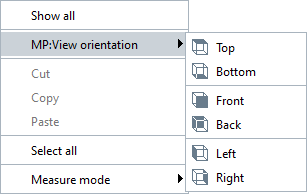
Next you need to select the view orientation: top, bottom, front, back, left or right.
In case of pre-selection of objects, the camera orientation on the 3D scene is performed along the boundary of the selected objects.
Starting with Renga 9.2, support for the plugin has been discontinued due to the introduction of similar functionality in the standard Renga functionality. If necessary, the plugin can be disabled under "Plugins" in the Auto update module.

 YouTube