


Dim break

Attention! The plugin is purchased for the specified version of nanoCAD!
Discount system
| Name | Discount | Total value of individual orders | Total value of corporate orders |
|---|---|---|---|
| Regular user | 0% | ||
| 3% discount | 3% | $84 | $180 |
| 5% discount | 5% | $120 | $360 |
| 7% discount | 7% | $180 | $600 |
| 10% discount | 10% | $300 | $900 |
| 15% discount | 15% | $360 | $1 200 |
| Partners | 30% | ||
| BIM Consulting | 50% | ||
| Super VIP | 100% |
A subscription is your best choice. Find out why!
To use the purchased license, use the Personal Area of the ModPlus software installed on your computer
Break the selected dimension into two or more new
Call options
- ModPlus floating menu or palette
- Menu, toolbar, or ribbon in nanoCAD
- Command line: _mncDimBreak
Icon


Using
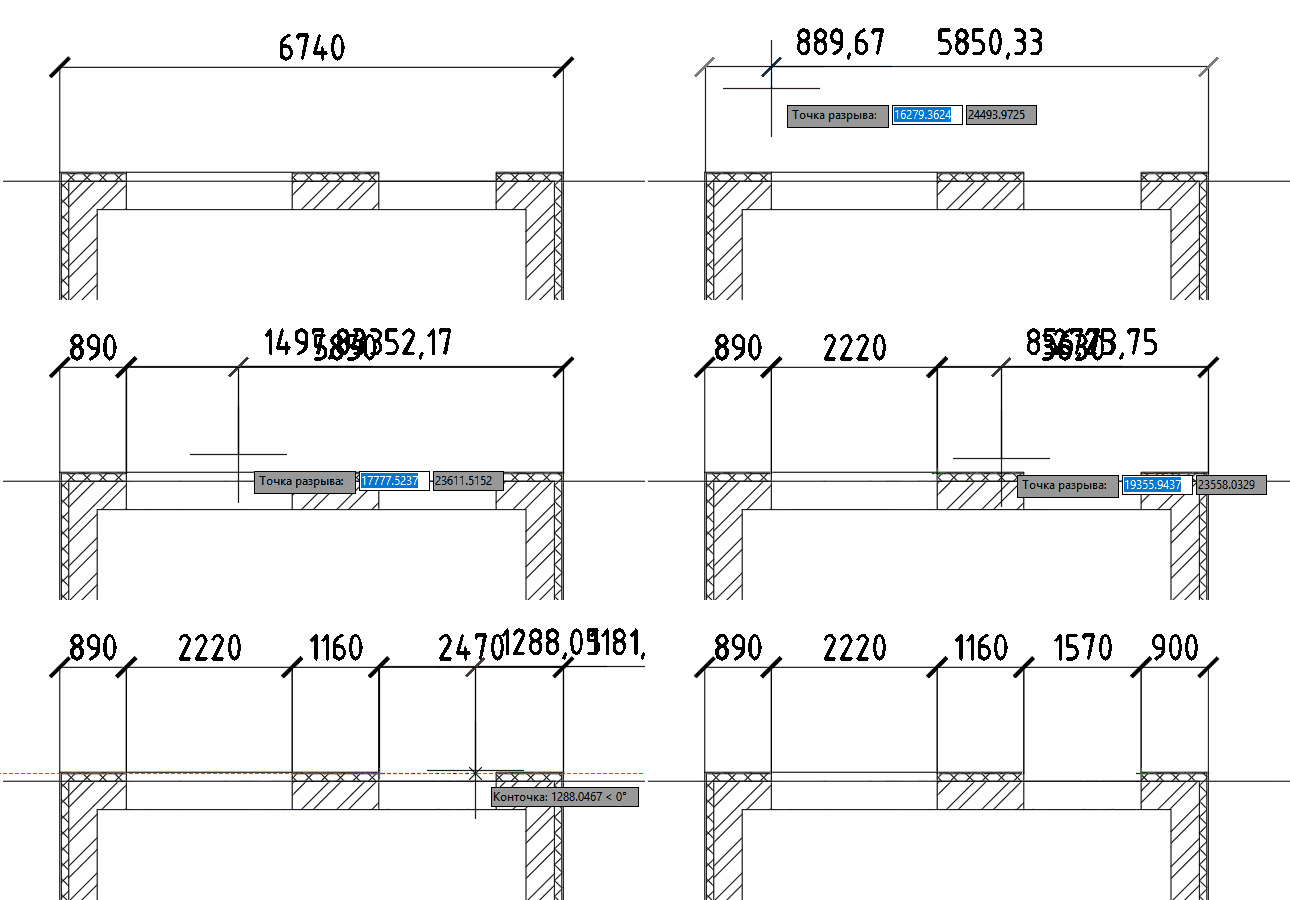
Select dimension: – select the dimension in the current drawing.
Break point: – specify point.
Plugin will work cyclically, until it is interrupted by the user (pressing Esc, space or Enter, or through the context menu). When specifying a point, the size "above this point" will be "torn" into two new dimensions.