
Tables

Tables
This is a free plugin!
Inserting AutoCAD tables into the drawing according to GOST/DSTU/STB or from a specified file

Call options

  • ModPlus floating menu or palette
  • AutoCAD ribbon
  • Command line: _mpTables

Icon

mpTables_32x32 mpTables_16x16 mpTables_32x32_dark mpTables_16x16_dark

Related news and articles


Using

ModPlus tables
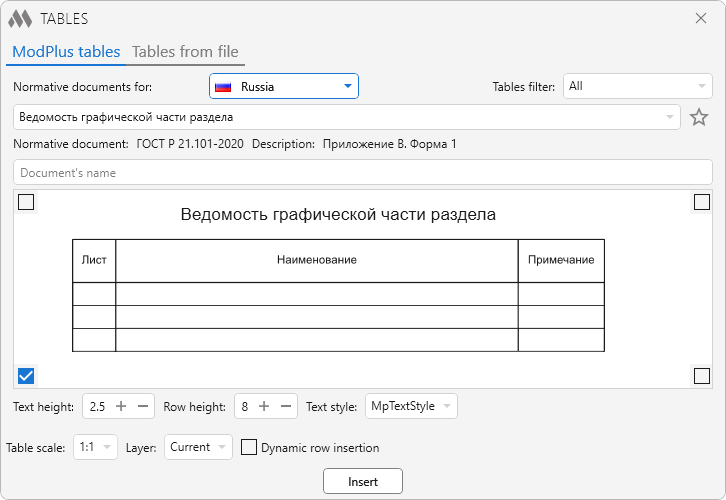
1

Normative documents for: – drop-down list for selecting a country, according to the norms of which lists of tables and normative documents will be filled.

Weed of normative document – drop-down list for selecting a filtering option, according to which a table selection list will be filled.

star outline (gray) – allows you to add/remove a table from your favorites list.

Normative document – field that displays the name of the normative document containing the selected table.

Description – contains a description of the location of the table in the normative document.

Below is the field for previewing the selected table. The image can be scaled by scrolling the mouse wheel, moved with the left mouse button held down, and fit within the field boundaries with the right mouse button. In the corners of the field are located radio buttons that determine the point of reference of the table when it is inserted into the drawing.

The group Table settings contains the following settings:

Text height – specifies the height of the text in the lines. Ignores the height in the title and header of the table.

Row height – set rows height. Ignores the height in the title and header of the table.

Text style – drop-down list containing all the text styles in the drawing. The text style applies to the entire table

Tables from file
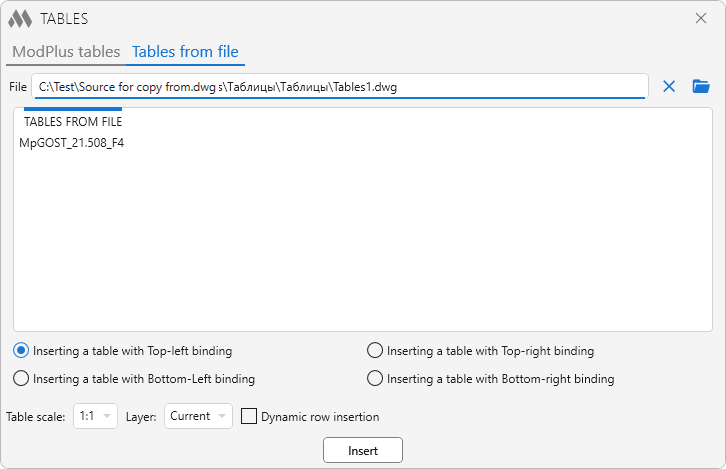
2

File – the output field of the path to the file from which you want to insert the table. This value is saved in the configuration file.

close – clear the path to the file (clear the field File).
folder open – specify the path to the file.

Tables from file – list of tables (table styles) in the specified file.

Inserting a table with Top-left/Bottom-left/Top-right/Bottom-right – the table anchor point when it is inserted into the drawing.


Table scale – drop-down list of annotation scales contained in the drawing.

Layer – drop-down list of layers contained in the drawing.

Dynamic row insertion – enable/disable the ability to dynamically insert rows (see below)

Insert – go to AutoCAD to insert a table:
Insertion point: – specify the insertion point.
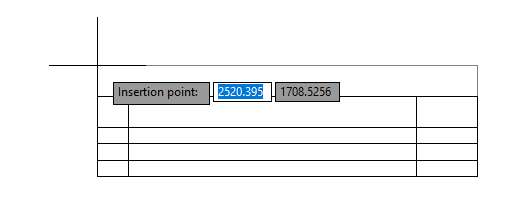
3

Specify second point: (when Dynamic row insertion is on) – specify a point. The number of rows of the inserted table will change.
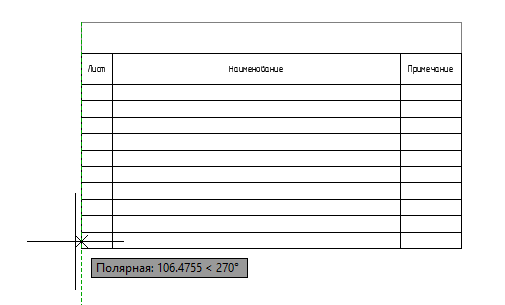
4

New
The interface was migrated to the current version of the ModPlus styling library
New
Raster preview images have been replaced by vector ones
New
Added two new tables according to GOST 2.701
Improved
Fixed alignment from "Top Left" to "Center Left" in cells of some tables
Fix
Version of dwg file with tables was lowered
New
Some GOSTs have been updated
New
Added tables: GOST 21.508-2020 form 6, GOST 21.501-2018 form 9
Improved
Changed tables: GOST 21.608-2021 form 1, GOST 21.608-2021 form 3, GOST 21.501-2018 form 1, GOST 21.502-2016 forms 1 and 2, GOST 21.110-2013 form 1, GOST 2.106-96 form 6, GOST 21.602-2003 forms 1 and 4
Improved
Removed change of text height in the headings of inserted tables
Improved
Improved some table styles
Improved
Corrected alignment in the table according to GOST 21.110 form 1
New
Tables according to GOST R 21.1101-2013 are replaced by tables according to GOST R 21.101-2020
New
Added the ability to mark a table flag "is favorite" and use the corresponding filter
New
Added the ability to specify the layer for the created table
Improved
General settings for tables from the plugin and tables from the specified file moved in the lower part of the window
Fix
Fixed bug when reading a table from a file that is open in AutoCAD
Fix
Fixed insert tables, if the layer "0" is locked
FIX
Fixed problem adding not valid (empty name) text style to the list of text styles
FIX
Pan the preview images is changed with the mouse wheel to left mouse button
FIX
When the table is selected in the list the scale of the preview image is reset
FIX
Changed the display of preview images
FIX
Added a new tables (form 1 – form 10) according to GOST 21.613-2014
FIX
Fixed a fatal error when selecting the binding in AutoCAD 2013-2015
FIX
Fixed a bug with setting the height of rows and the height of text when scale is not 1:1
FIX
Corrected column heading in the table according to form 1 GOST 21.508-93
FIX
Fixed bug when inserting the table in form 13 GOST 21.1101-2013
FIX
Replacement of the main icons of the function with the addition of icons for the dark AutoCAD ribbon design theme
FIX
A typo in the table according to form 3 of GOST 21.508-93 has been fixed
FIX
Storage of base tables moved to one file.
FIX
Added table according to GOST 21.111-84 Form 1 "Statement of the volume of construction and installation works"
FIX
Updated current versions of regulatory documents clarified.
FIX
Added "side stamps" in accordance with GOST 21.608-2014 Forms 4 and 5
FIX
Small changes in the design of the window function
FIX
Added ability to select the source database tables depending on the country
FIX
Added tables to documents: DSTU B A. 2.4-4:2009 for Ukraine and STB 2255-2012 for Belarus
FIX
Reworked the internal working methods of the function with the database table
FIX
Dwg files of the tables, divided according to countries
FIX
Removed the button "minimize the window"
FIX
Fixed some bugs
FIX
Fixed small error in the code
FIX
Fixed a bug that caused cleaning the cell text Height and the Height of the lines in the program window the first time you use the function
FIX
Removed option "Dynamic rendering of a table when inserting"
FIX
Fixed problem with fatal error when inserting tables in some files (mostly AutoCad 2016)
FIX
Fixed binding the table to the insertion point in the "drawing cursor"
FIX
Added the ability to insert tables without drawing the cursor in the process of specifying the insertion point
FIX
When inserting tables sometimes there is a fatal error in AutoCad. In this regard, the code for inserting tables in the drawing has been redone
FIX
Added a new table (11 pieces) according to GOST 21.701-2013 "ASAP. Rules of execution of working documentation for roads"
FIX
Added the ability to zoom and pan the image preview of tables
FIX
Replaced all image preview tables
FIX
Added display of the document title in the window functions
FIX
Added the ability to delete a file path to insert table from a file
FIX
Fixed bug when insert some tables
FIX
Various small changes
FIX
Fixed problem rewriting the text style MpTxtStyle when you insert a table
FIX
Removed regeneration after inserting the table
FIX
Improved application properties to the inserted table
FIX
Small changes in the design window
FIX
Modified GOST R 21.1101-2009, GOST R 21.1101-2013
FIX
Added table according to GOST 21.602-2003 (Forms 1,2,3,4)
FIX
A variety of related fixes in the code
FIX
Fixed bug not allowing to copy tables from resource programs to drive user