
Auto layers

Auto layers
Attention! The plugin is purchased for the specified version of AutoCAD!
$7.20
Discount system: 0%
Discount system
Name Discount Total value of individual orders Total value of corporate orders
Regular user 0%
3% discount 3% $84 $180
5% discount 5% $120 $360
7% discount 7% $180 $600
10% discount 10% $300 $900
15% discount 15% $360 $1 200
Partners 30%
BIM Consulting 50%
Super VIP 100%
A subscription is your best choice. Find out why!
To use the purchased license, use the Personal Area of the ModPlus software installed on your computer

Automatic layer assignment to created objects


Call options

  • ModPlus floating menu or palette
  • AutoCAD ribbon
  • Command line: _mpLayerAuto

Icon

mpLayerAuto_32x32 mpLayerAuto_16x16 mpLayerAuto_32x32_dark mpLayerAuto_16x16_dark


Related news and articles


Using

The upper part of the plugin window contains three switches that enable or disable modes for assigning layers in the current document – by primitive type, by block name, and by command name.

Below are settings divided into two groups – layer assignment and command settings for exclusion. Layer assignment is further divided into layers for primitives, layers for blocks by name, and layers for commands by name.

All settings are saved globally and applied to all drawings.

Layers for primitives
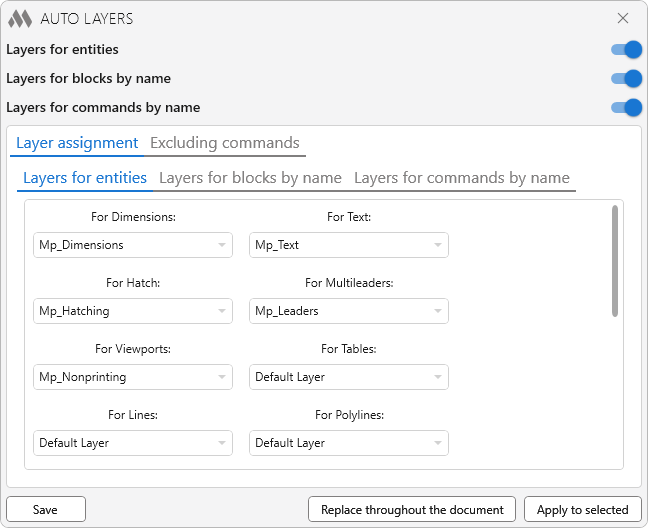
1

This group contains layer settings for primitives based on their type. The lists are filled with layer names available in the current drawing. When selecting "Default layer", the object will be assigned the layer set as default in the drawing. If the assigned layer is later deleted from the drawing, the object will be assigned the default layer.

If the plugin is launched in a drawing where there are no layers saved in the settings, the layer in the dropdown list will be displayed in red.

Layers for revision clouds are available starting from AutoCAD version 2021.

Layers for blocks by name
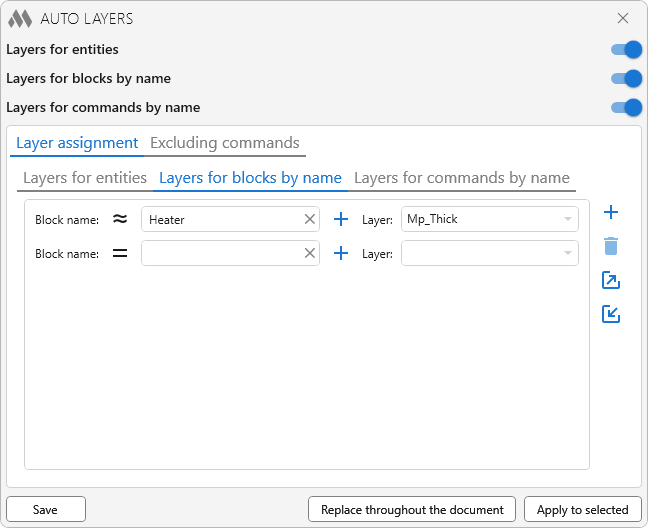
2

This group contains a list of rules for assigning layers to blocks depending on block names.

Note: layer assignment for a block by name has higher priority than layer assignment for the primitive type "Block".

For each rule, you must specify the matching condition – exact match or partial match (block name contains the specified value). Case is ignored. The layer can be selected from the dropdown list filled with layers of the current drawing or entered manually.

plus – add a new rule.

delete – delete the selected rule.

export – export rules to an XML file.

import – import rules from an XML file. All current rules will be removed.

Layers for commands by name
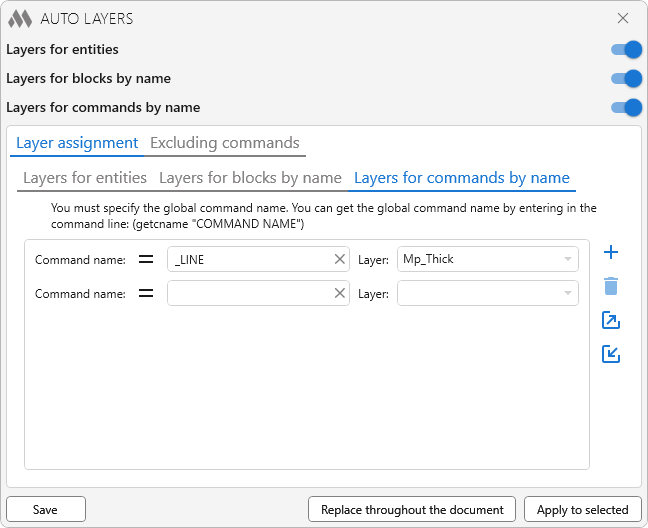
4

This group contains rules for assigning layers to commands based on their global names. The global command name can be obtained by entering the following expression in the command line: (getcname "COMMAND NAME").

Note: layer assignment for a command by name has higher priority than settings for blocks by name and primitives by type.

For each rule, specify the matching condition – exact or partial match (command name contains the specified value). Case is ignored. The layer can be selected from the dropdown list or entered manually.

plus – add a new rule.

delete – delete the selected rule.

export – export rules to an XML file.

import – import rules from an XML file. All current rules will be removed.

Excluding commands
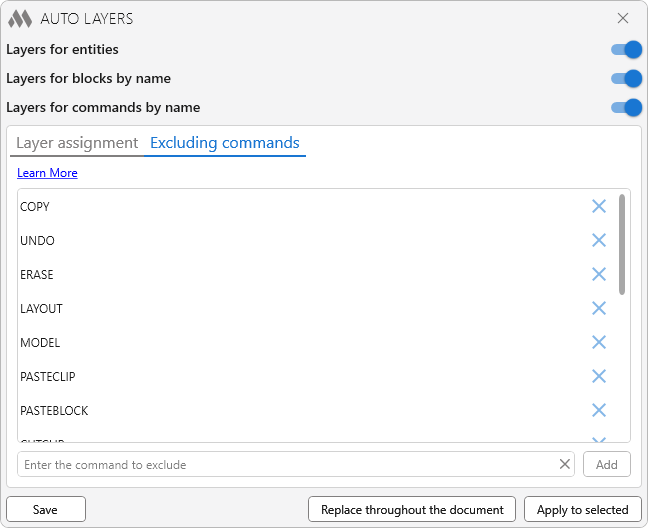
3

On this tab, you can edit (add or remove) the list of commands to be excluded from processing by the plugin.

The standard set of commands for exclusion is not editable!


Save – save all settings and close the window.

Replace throughout the document – apply the specified layer settings to all primitives in the document.

Apply to selected – apply all specified layer settings to selected entities.

ModPlus YouTube
ModPlus YouTube
Improved
The interface was migrated to the current version of the ModPlus styling library
New
Added the ability to assign layers to commands
Fix
Fixed an issue where imported saved layer values for blocks by name were not displayed
Fix
Fixed a bug that caused the delete button for the layer rule by block name to remain permanently inactive
Fix
Fixed a bug that could cause objects to be moved to specified layers when using their grips
New
Added the ability to replace layers for objects on all layouts
Improved
Changes have been made to the full version verification algorithm of the plugin
Improved
Removed support for revision clouds in AutoCAD versions lower than 2021
Improved
Alphabetical order of the block list
Improved
Exclude anonymous blocks from the block list
Fix
Fixed an issue where some versions of AutoCAD would not detect revision clouds
Fix
Fixed some errors occurring when working with the list of layers for blocks
Improved
Export/Import icons replaced
Fix
Fixed a bug where saved layer settings were not loaded
Improved
Correct plugin operation in cases when layers were added after loading
Fix
Fixed color of text in tooltips
Fix
Fixed an issue when trying to follow a link in AutoCAD 2025
Improved
The REFEDIT command has been added to the exclusion list
Fix
Fixed design with dark design themes
Fix
Fixed a bug where a layer set for revision clouds was applied to regular polylines
New
Added Revision Cloud processing
Fix
Fixed a bug where a layer was not applied to selected objects if the settings were not previously saved in the drawing
Fix
Fixed a bug where layers for blocks were not deleted after saving
Fix
Fixed a bug where block layers could not be deleted
Improved
Optimizing processing of commands in the ignore list
New
Global saving of settings: now the settings will not be unique for each drawing
Fix
Fixed a bug where auto layers stopped working after switching between drawings
New
Added the ability to set layers for blocks with specific names
Improved
The plugin window has been redesigned. Plugin window can now be stretched
Improved
Optimization of the plugin code
New
Added commands "MIRROR" and "ADDSELECTED" to the standard list of commands to ignore
FIX
Added the ability to set the layer for xlines, rays, circles, ellipses, splines, arcs,
FIX
Corrected icon functions
FIX
Changed function description
FIX
Added the ability to set a layer for lines and polylines
FIX
Replacement of main function icons adding icons for dark themes the AutoCAD ribbon
FIX
Added EATTEDIT and BEDIT commands to the exclusion list
FIX
Removed the message “no document”, added early to test
FIX
Fixed error reading list of commands to exception
FIX
Changed the mechanism to function in the best stability (experimental)
FIX
Added the ability to set layers for the selected objects from the window function
FIX
Added the ability to save/load settings layers
FIX
Some minor changes in the code
FIX
Added the ability to edit the list of commands to exclude from the processing function
FIX
Important critical fixes in the code
FIX
Important critical fixes in the code