
Draworder by layer

Draworder by layer
This is a free plugin!
Changing the draw order of objects according to layers

Call options

  • ModPlus floating menu or palette
  • AutoCAD ribbon
  • Command line: _mpDrawOrderByLayer

Icon

mpDrawOrderByLayer_32x32 mpDrawOrderByLayer_16x16 mpDrawOrderByLayer_32x32_dark mpDrawOrderByLayer_16x16_dark

Using

Plugin processes the layers checked in the window, changing the drawing order according to the order of the checked layers. There is an "Auto" mode, which automatically changes the order of drawing of objects on one of the two specified layers when creating or editing

Reorder by layer
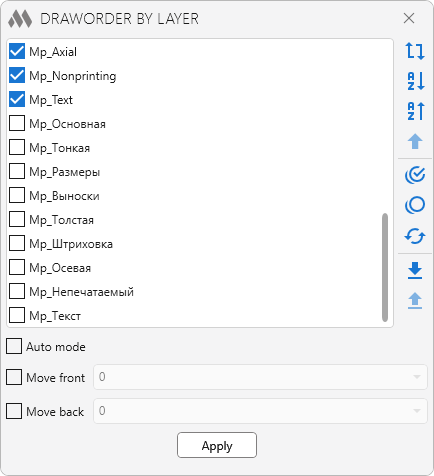
1
Specify in the list of layers those layers that need to be processed. Arrange them in the order you want and click Apply. The following items are provided for managing the list:

repeat rotated – reverse the entire list
sort alphabetical ascending – sorting in ascending order
sort alphabetical descending – sorting in descending order
arrow up – move the selected layer to the beginning of the list

checkbox multiple marked circle outline – select all layers
checkbox multiple blank circle outline – unselect all layers
download – inversion of selection

download – save the current position of layers in the drawing
upload – load and apply the layer position saved in the current drawing. Layers that were added after saving the position will be moved to the end of the list

Auto mode – automatic positioning of entities on a layer
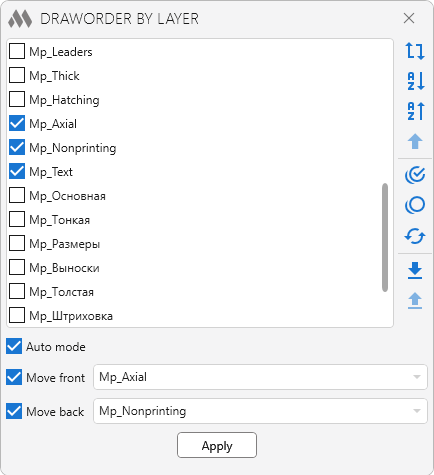
2
This feature allows you to track entities on specified layers and move them either in front of entities or back of entities

Apply – apply changes and close plugin window

ModPlus YouTube
Improved
The interface was migrated to the current version of the ModPlus styling library
Improved
Service update due to replacement of auxiliary library to prevent conflicts with other plugins
New
Added ability to sort the list in ascending or descending order
New
Added ability to move the selected layer to the beginning of the list
FIX
Corrected icon functions
FIX
Fixed some bugs
FIX
Added regeneration after changing the drawing order
FIX
Fixed the cause of a fatal error when you try to change the drawing order in the case that there are no entities on selected layers
FIX
Added the ability to save and load the adjusted position of the layers in the current drawing
FIX
Replacement of main function icons adding icons for dark themes the AutoCAD ribbon
FIX
Removed buttons "up" and "down", which are unnecessary due to the use of Drag-and-drop
FIX
Fixed the problem of displaying layers that have a lower underscore in the name
FIX
Fixed a bug that caused a fatal shutdown when applying changes to the drawing order
FIX
Added closed windows Options by pressing Esc
FIX
The Functions window is made non-modal (does not block Auto CAD)
FIX
Added the ability to stretch the window
FIX
Added ability to change the order of layers in the list by dragging with the left mouse button
FIX
Fixed a bug that sometimes appears after creating a new layer when the "Auto" mode is on
FIX
Исправлена фатальная ошибка при открытии окна Функции